Wattpad Website Redesign

Introduction

Why Wattpad?

Wattpad is a widely popular platform for readers and writers to share and discover stories. However, its interface poses challenges for navigation, accessibility, and user engagement, impacting user experience. By redesigning Wattpad, I aimed to address usability issues, improve functionality, and enhance overall satisfaction.

Why Wattpad?

Wattpad is a widely popular platform for readers and writers to share and discover stories. However, its interface poses challenges for navigation, accessibility, and user engagement, impacting user experience. By redesigning Wattpad, I aimed to address usability issues, improve functionality, and enhance overall satisfaction.

Why Wattpad?

Wattpad is a widely popular platform for readers and writers to share and discover stories. However, its interface poses challenges for navigation, accessibility, and user engagement, impacting user experience. By redesigning Wattpad, I aimed to address usability issues, improve functionality, and enhance overall satisfaction.

Why Wattpad?

Wattpad is a widely popular platform for readers and writers to share and discover stories. However, its interface poses challenges for navigation, accessibility, and user engagement, impacting user experience. By redesigning Wattpad, I aimed to address usability issues, improve functionality, and enhance overall satisfaction.

Team

Team

Team

Team

Individual

Individual

Individual

Individual

Role

Role

Role

Role

Researcher, Designer

Researcher, Designer

Researcher, Designer

Researcher, Designer

Duration

Duration

Duration

Duration

3 months, 2023

3 months, 2023

3 months, 2023

3 months, 2023

Step Inside the Solution

Homepage

Why

Why

Why

Why

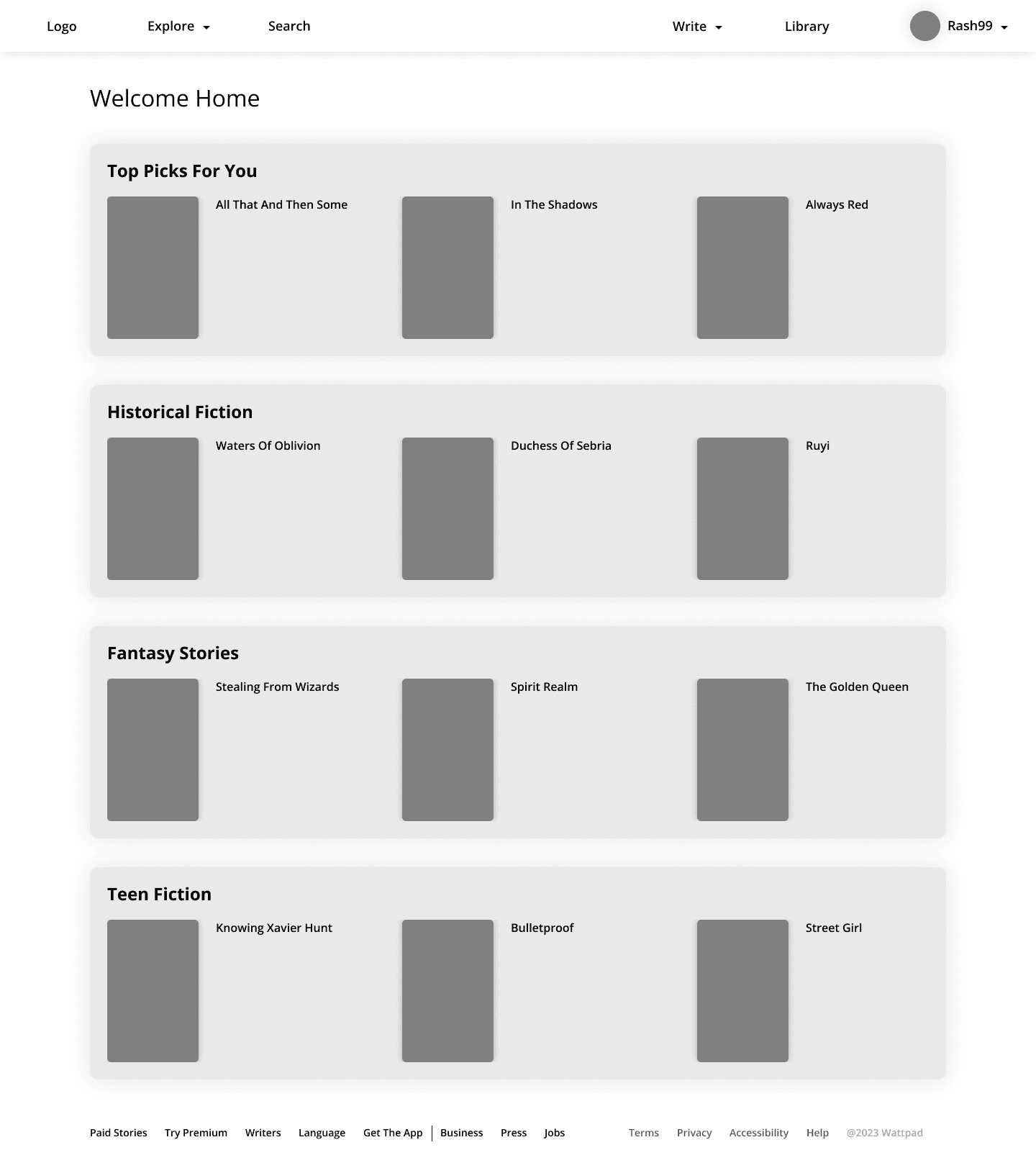
Users needed quick access to essential features and a less overwhelming layout.

Users needed quick access to essential features and a less overwhelming layout.

Users needed quick access to essential features and a less overwhelming layout.

Users needed quick access to essential features and a less overwhelming layout.

Action Taken

Action Taken

Action Taken

Action Taken

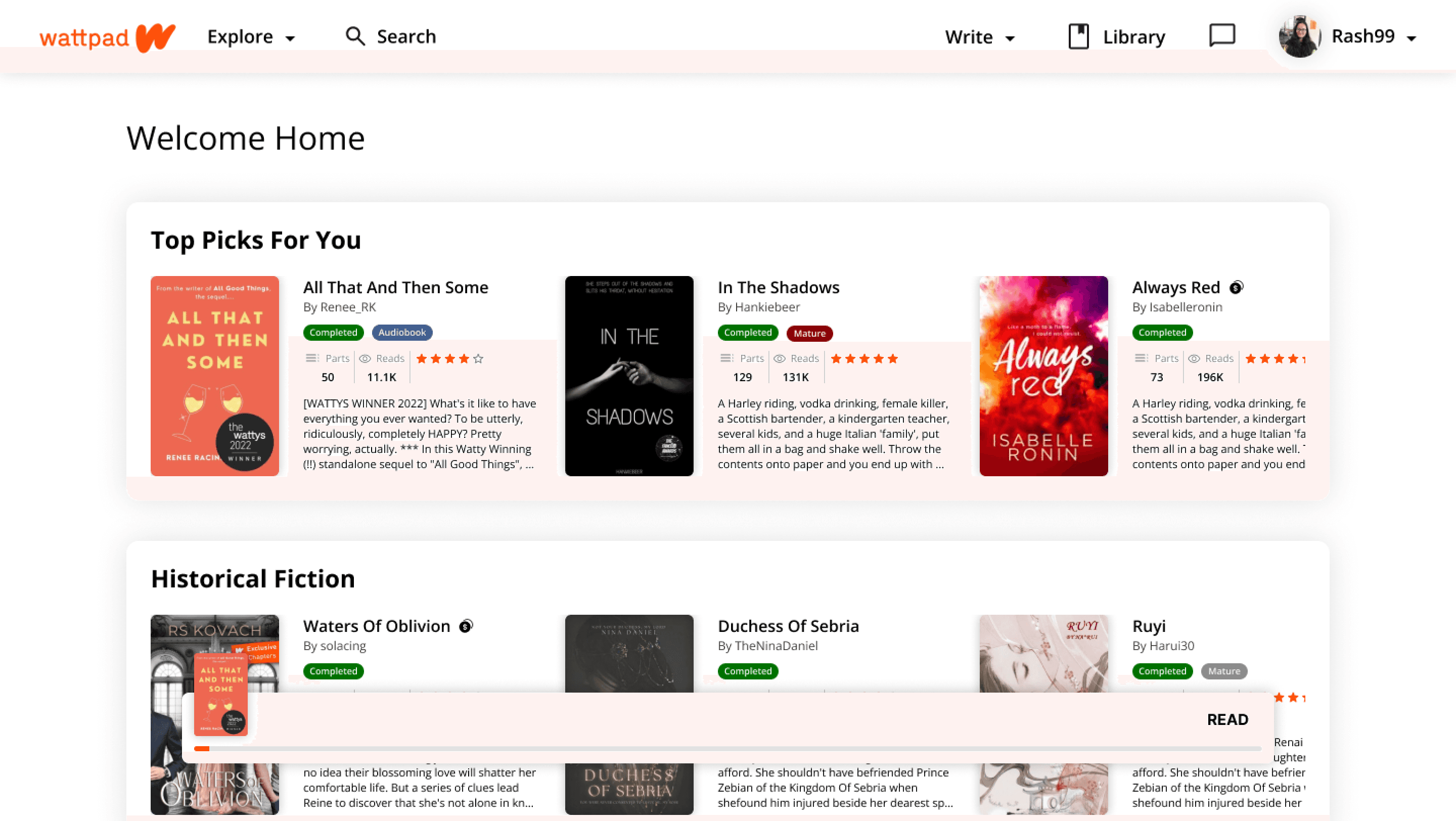
  • Library and Inbox placed prominently on the navigation bar for easy access.

  • Book details, including title, author, and status (e.g., "Audiobook available"), are displayed directly on the homepage, enabling users to make quick decisions.

  • Library and Inbox placed prominently on the navigation bar for easy access.

  • Book details, including title, author, and status (e.g., "Audiobook available"), are displayed directly on the homepage, enabling users to make quick decisions.

  • Library and Inbox placed prominently on the navigation bar for easy access.

  • Book details, including title, author, and status (e.g., "Audiobook available"), are displayed directly on the homepage, enabling users to make quick decisions.

  • Library and Inbox placed prominently on the navigation bar for easy access.

  • Book details, including title, author, and status (e.g., "Audiobook available"), are displayed directly on the homepage, enabling users to make quick decisions.

Book Details Page

Why

Why

Why

Why

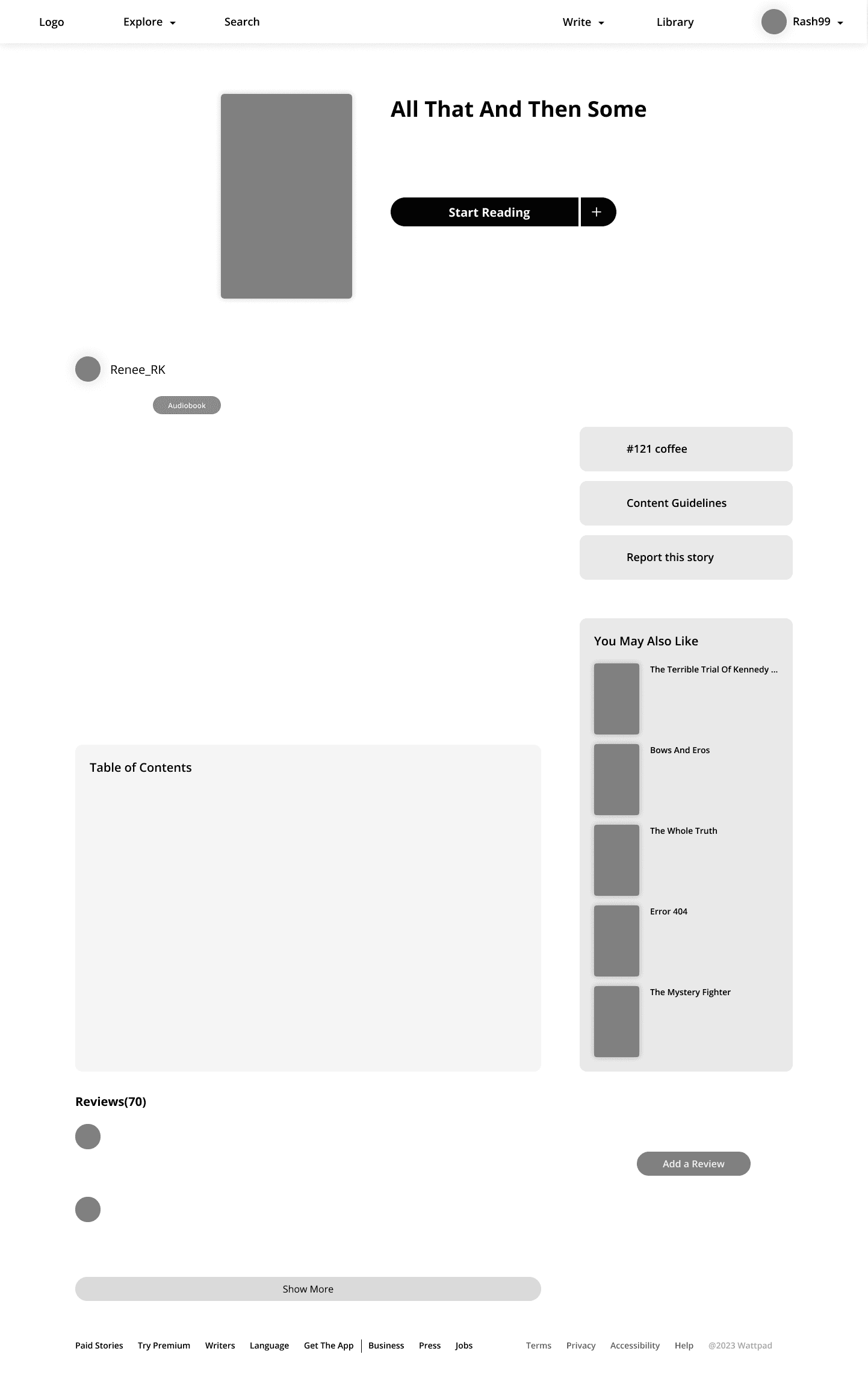
Users lacked comprehensive information about books and a way to interact with reviews.

Users lacked comprehensive information about books and a way to interact with reviews.

Users lacked comprehensive information about books and a way to interact with reviews.

Users lacked comprehensive information about books and a way to interact with reviews.

Action Taken

Action Taken

Action Taken

Action Taken

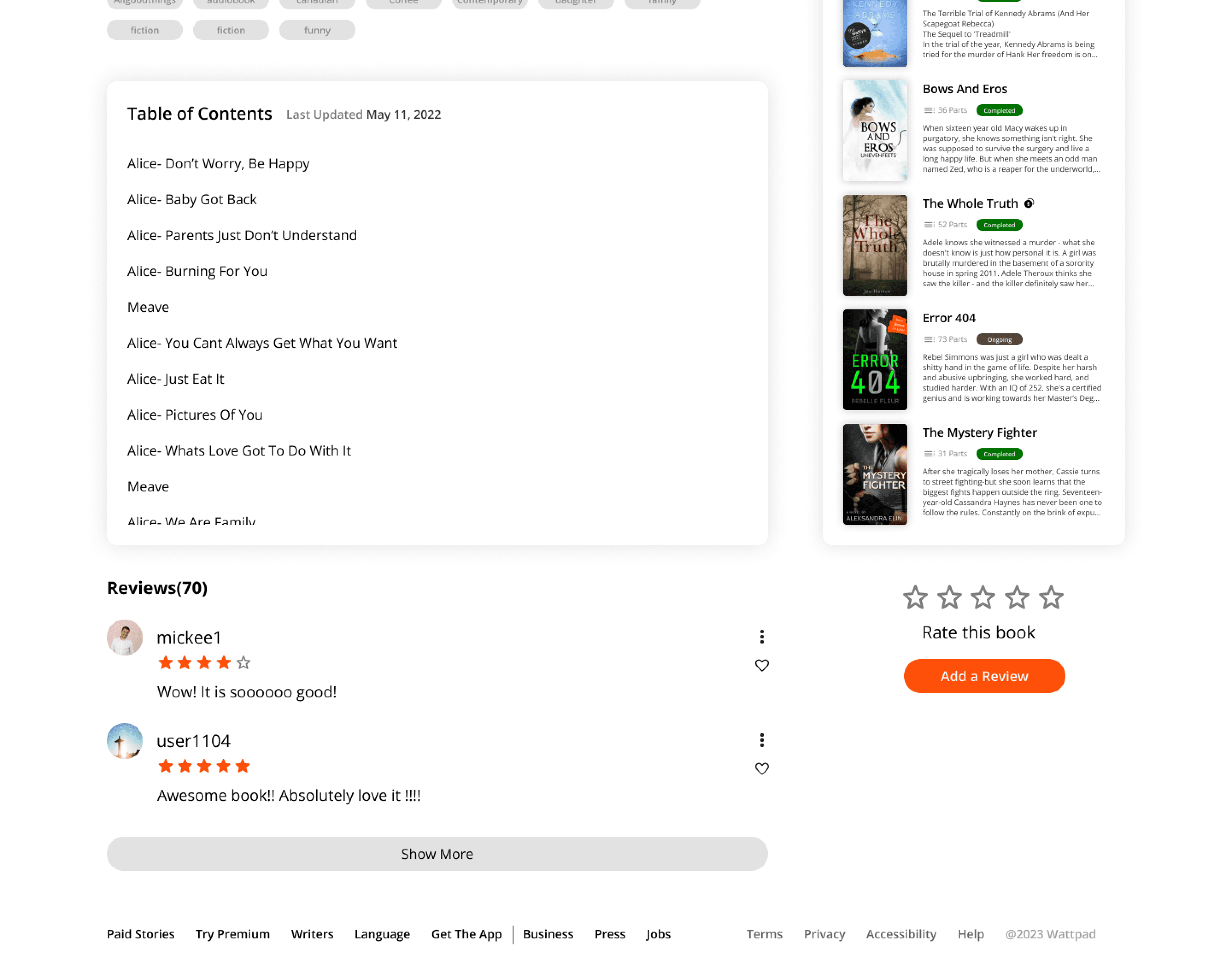
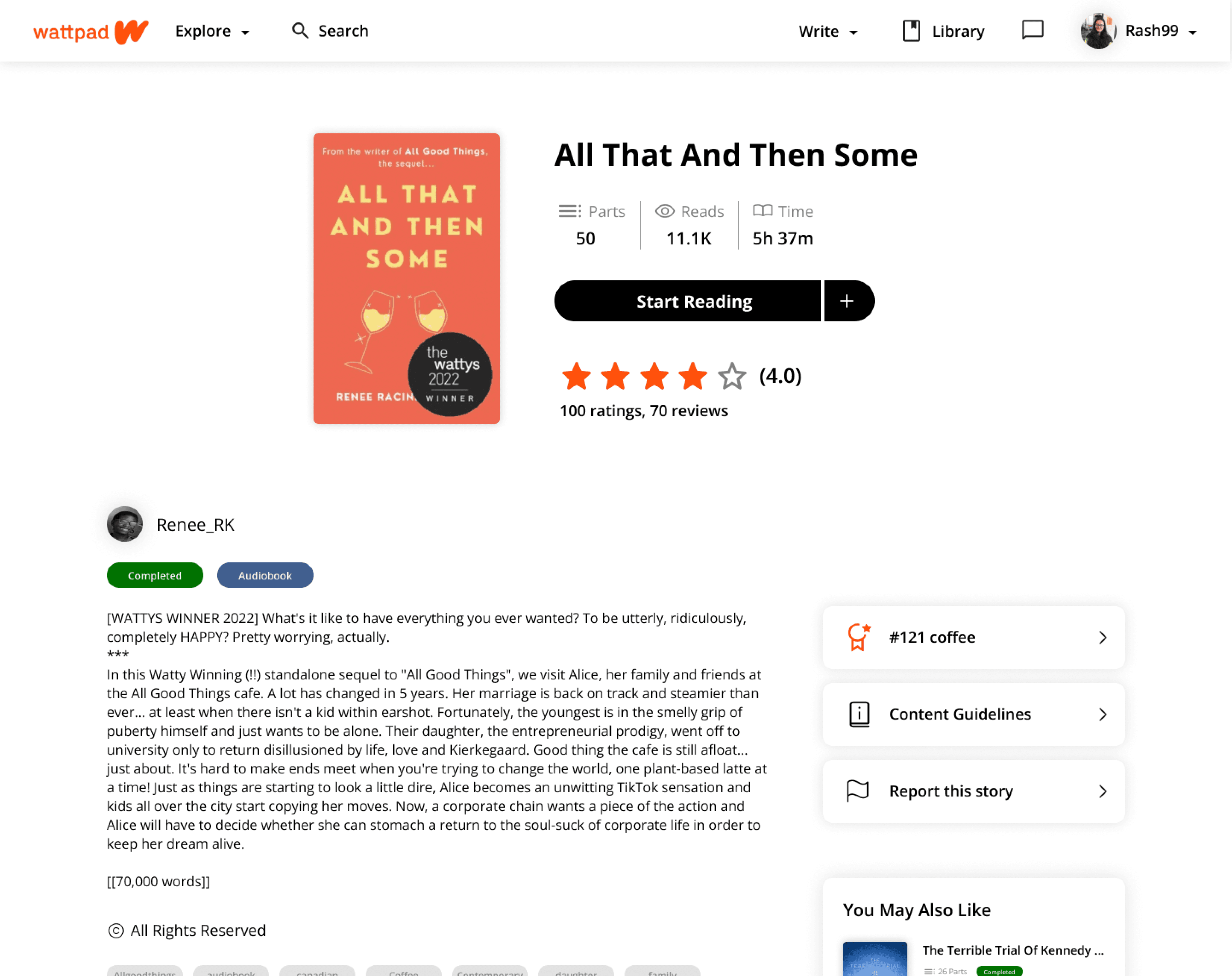
  • Status indicators like "Audiobook available" and "Completed" are clearly shown.

  • Overall ratings are displayed as visual indicators.

  • A dedicated review section allows users to read and contribute reviews, fostering community interaction.

  • Status indicators like "Audiobook available" and "Completed" are clearly shown.

  • Overall ratings are displayed as visual indicators.

  • A dedicated review section allows users to read and contribute reviews, fostering community interaction.

  • Status indicators like "Audiobook available" and "Completed" are clearly shown.

  • Overall ratings are displayed as visual indicators.

  • A dedicated review section allows users to read and contribute reviews, fostering community interaction.

  • Status indicators like "Audiobook available" and "Completed" are clearly shown.

  • Overall ratings are displayed as visual indicators.

  • A dedicated review section allows users to read and contribute reviews, fostering community interaction.

Reading Page

Why

Why

Why

Why

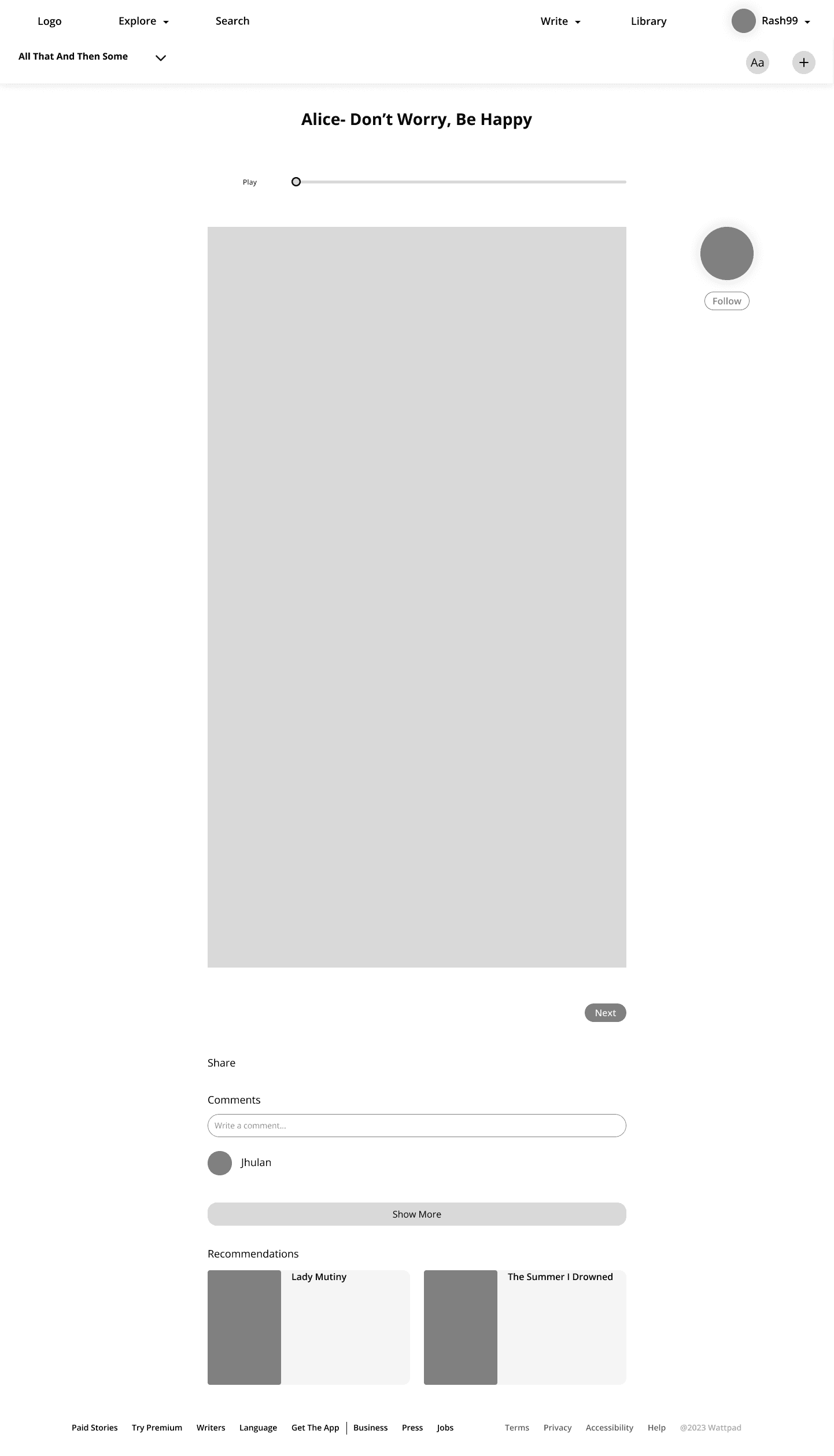
Users wanted more control over their reading and listening experience

Users wanted more control over their reading and listening experience

Users wanted more control over their reading and listening experience

Users wanted more control over their reading and listening experience

Action Taken

Action Taken

Action Taken

Action Taken

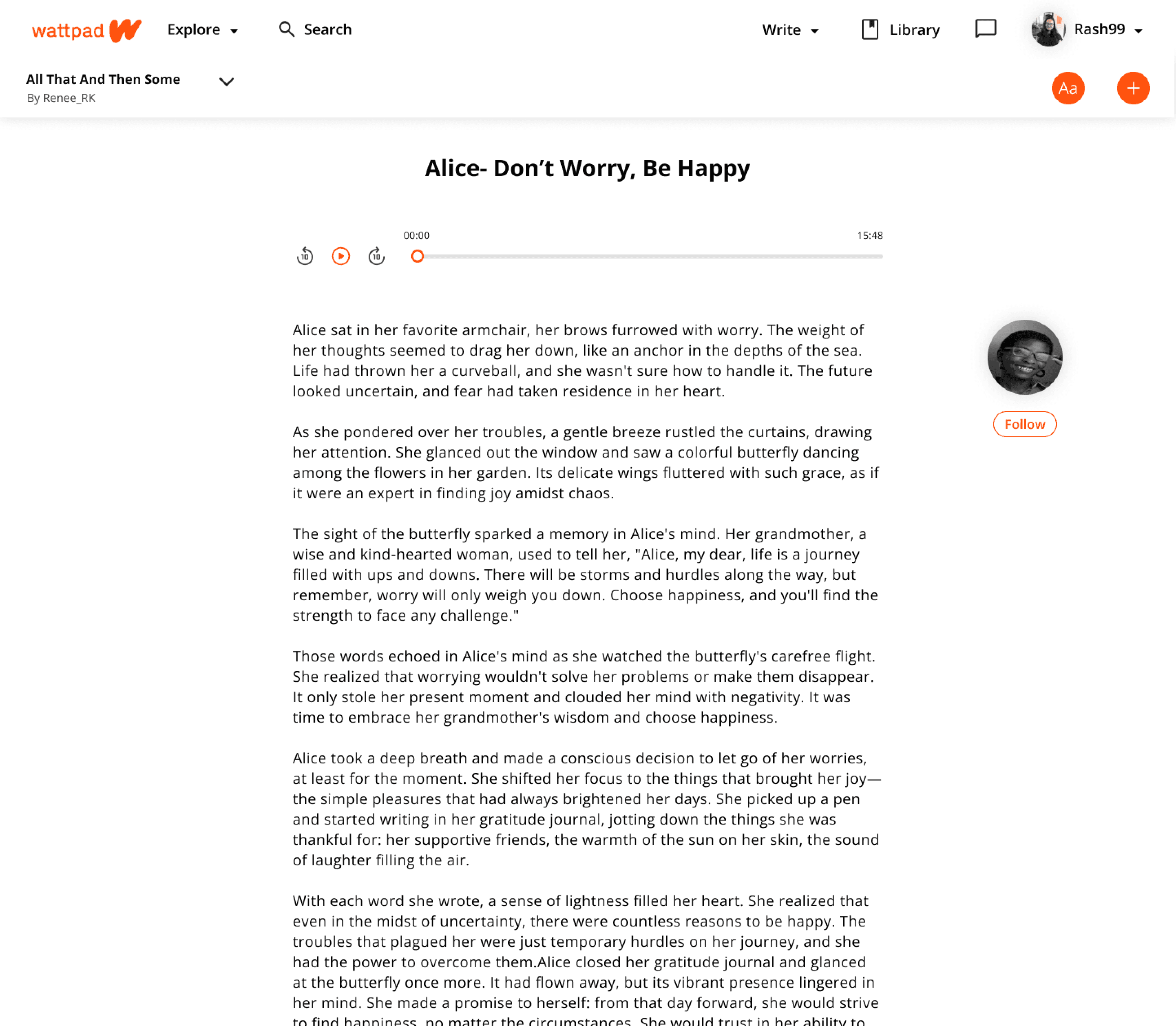
  • Display settings allow customization of font size, background color, and text alignment to suit user preferences.

  • An integrated audiobook player features controls for playback speed, chapter selection, and bookmarking, ensuring a seamless experience.

  • Display settings allow customization of font size, background color, and text alignment to suit user preferences.

  • An integrated audiobook player features controls for playback speed, chapter selection, and bookmarking, ensuring a seamless experience.

  • Display settings allow customization of font size, background color, and text alignment to suit user preferences.

  • An integrated audiobook player features controls for playback speed, chapter selection, and bookmarking, ensuring a seamless experience.

  • Display settings allow customization of font size, background color, and text alignment to suit user preferences.

  • An integrated audiobook player features controls for playback speed, chapter selection, and bookmarking, ensuring a seamless experience.

Page Navigation

Why

Why

Why

Why

Scrolling through lengthy pages was cumbersome for users.

Scrolling through lengthy pages was cumbersome for users.

Scrolling through lengthy pages was cumbersome for users.

Scrolling through lengthy pages was cumbersome for users.

Action Taken

Action Taken

Action Taken

Action Taken

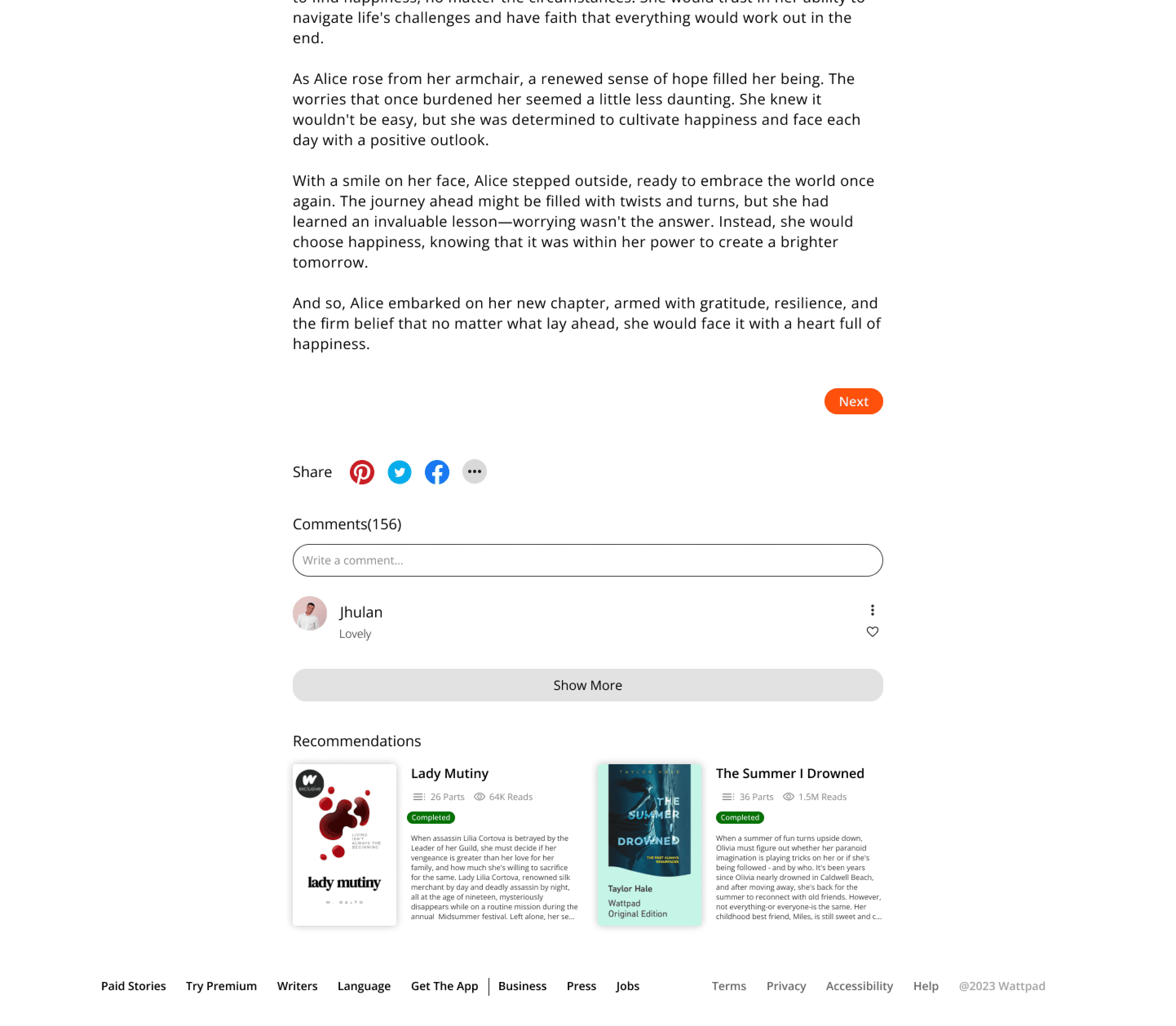
  • Paging replaced infinite scrolling, allowing users to navigate chapters or lists more efficiently.

  • Visual indicators show the current page and total pages, enhancing orientation.

  • Paging replaced infinite scrolling, allowing users to navigate chapters or lists more efficiently.

  • Visual indicators show the current page and total pages, enhancing orientation.

  • Paging replaced infinite scrolling, allowing users to navigate chapters or lists more efficiently.

  • Visual indicators show the current page and total pages, enhancing orientation.

  • Paging replaced infinite scrolling, allowing users to navigate chapters or lists more efficiently.

  • Visual indicators show the current page and total pages, enhancing orientation.

Audiobook Browse

Why

Why

Why

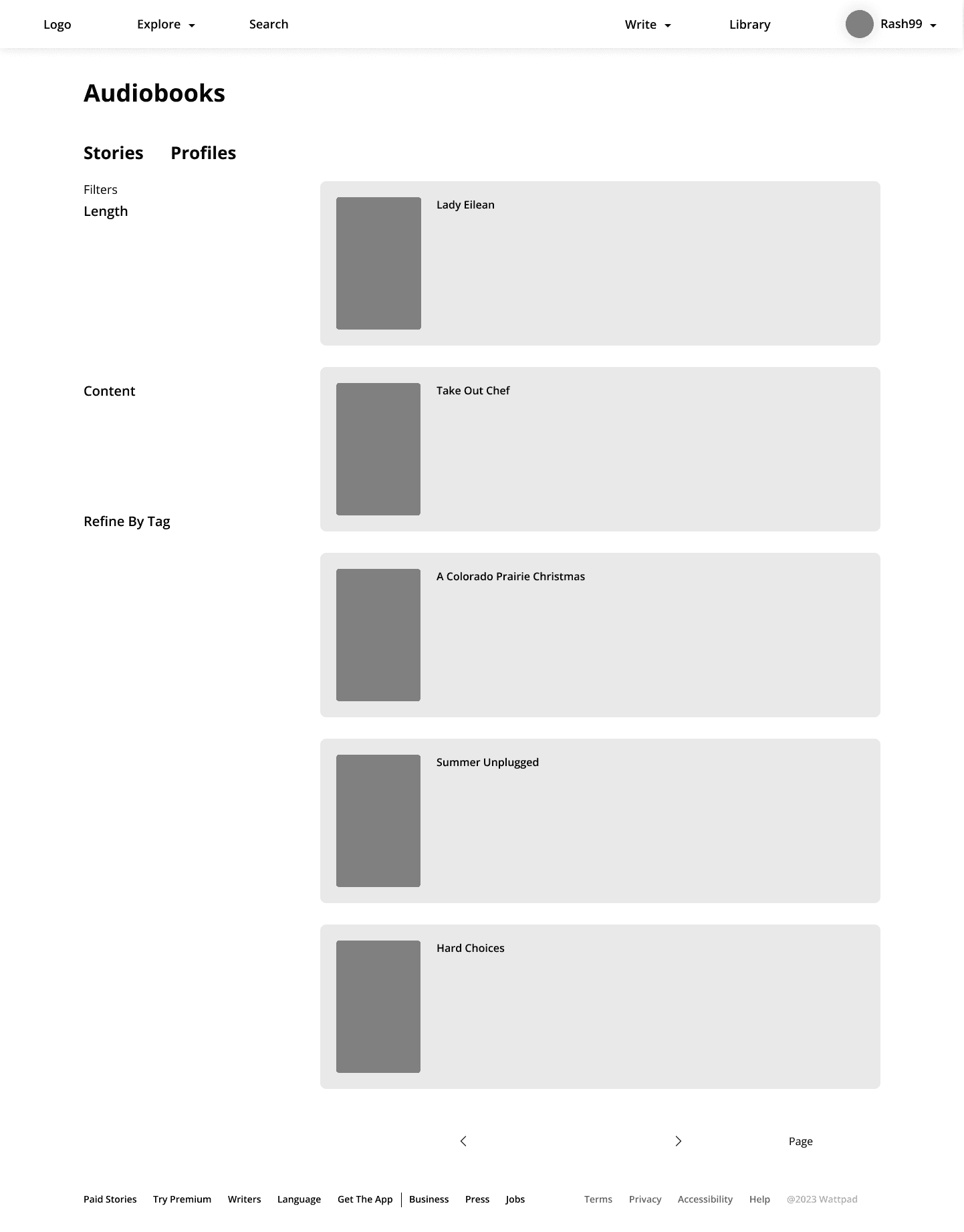
Users struggled to find audiobooks due to a lack of filtering options.

Users struggled to find audiobooks due to a lack of filtering options.

Users struggled to find audiobooks due to a lack of filtering options.

Users struggled to find audiobooks due to a lack of filtering options.

Action Taken

Action Taken

Action Taken

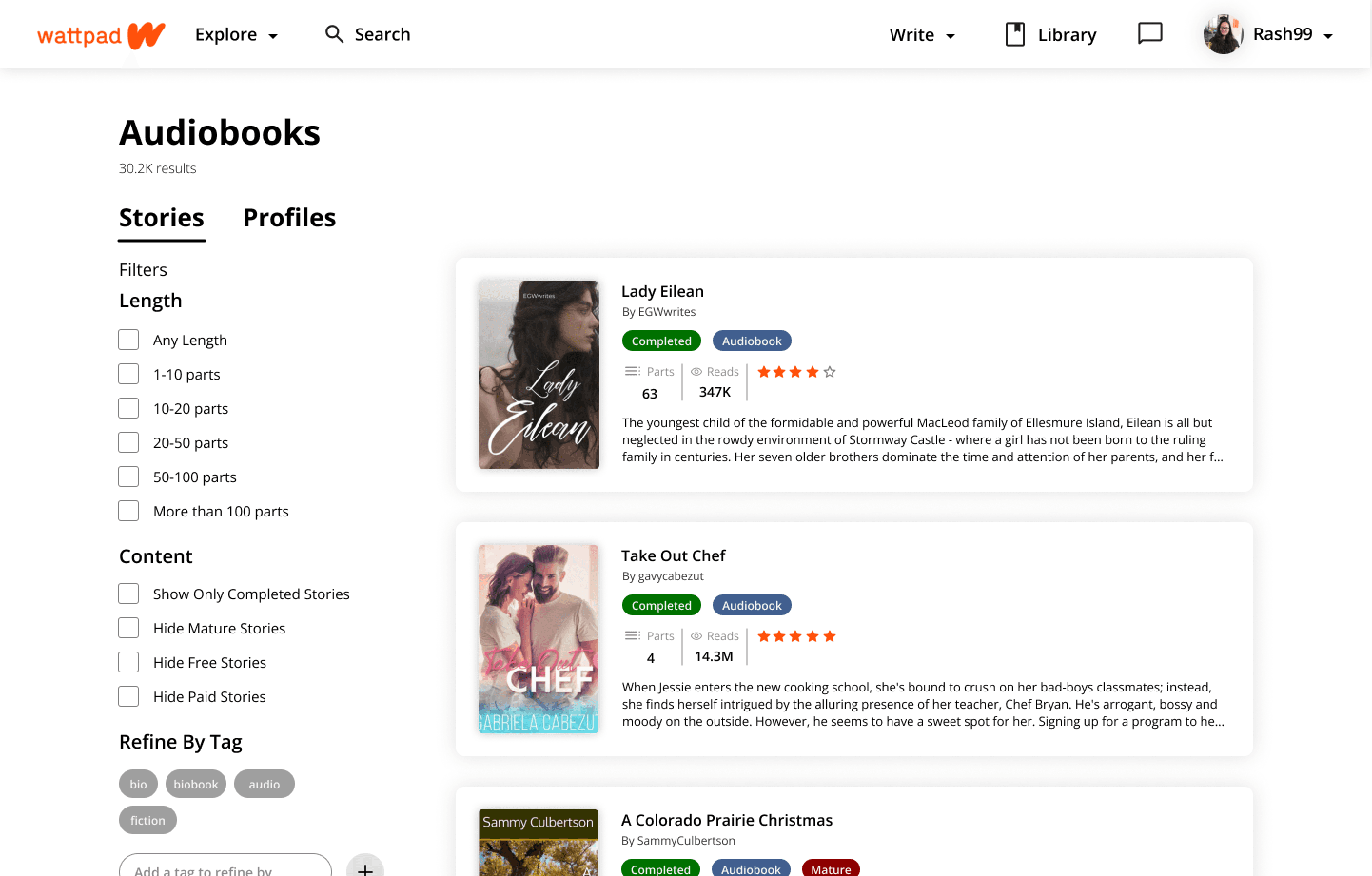
  • A filter panel includes options such as genre, length, author, and ratings to help users refine their search.

  • Audiobook previews and sample plays are accessible directly from the browse page.

  • A filter panel includes options such as genre, length, author, and ratings to help users refine their search.

  • Audiobook previews and sample plays are accessible directly from the browse page.

  • A filter panel includes options such as genre, length, author, and ratings to help users refine their search.

  • Audiobook previews and sample plays are accessible directly from the browse page.

Project Objective

This is a usability-focused project undertaken to deepen my understanding of Human-Computer Interaction (HCI) and User Experience Design (UXD). By applying usability principles and conducting extensive research, I sought to redesign the Wattpad website to create a user-friendly and engaging platform.

Secondary Research

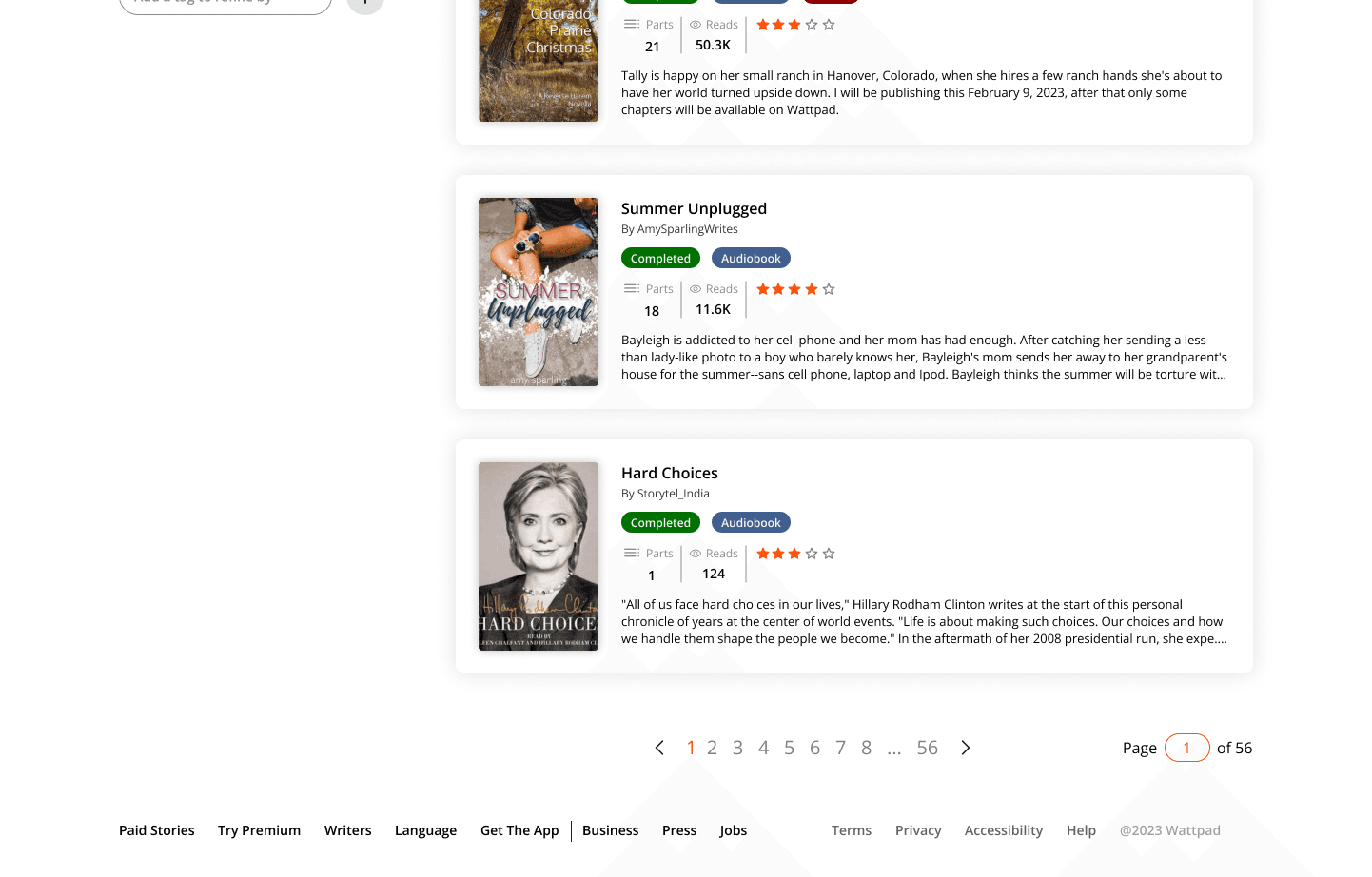
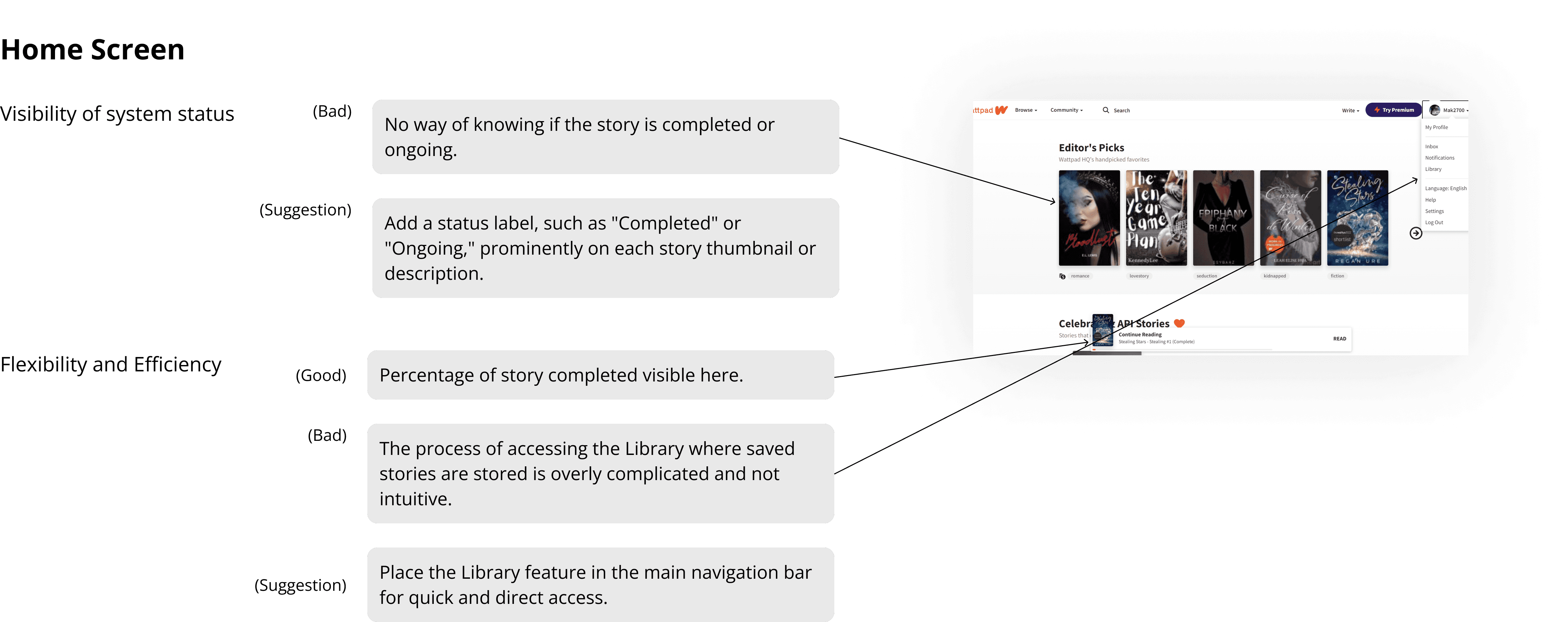
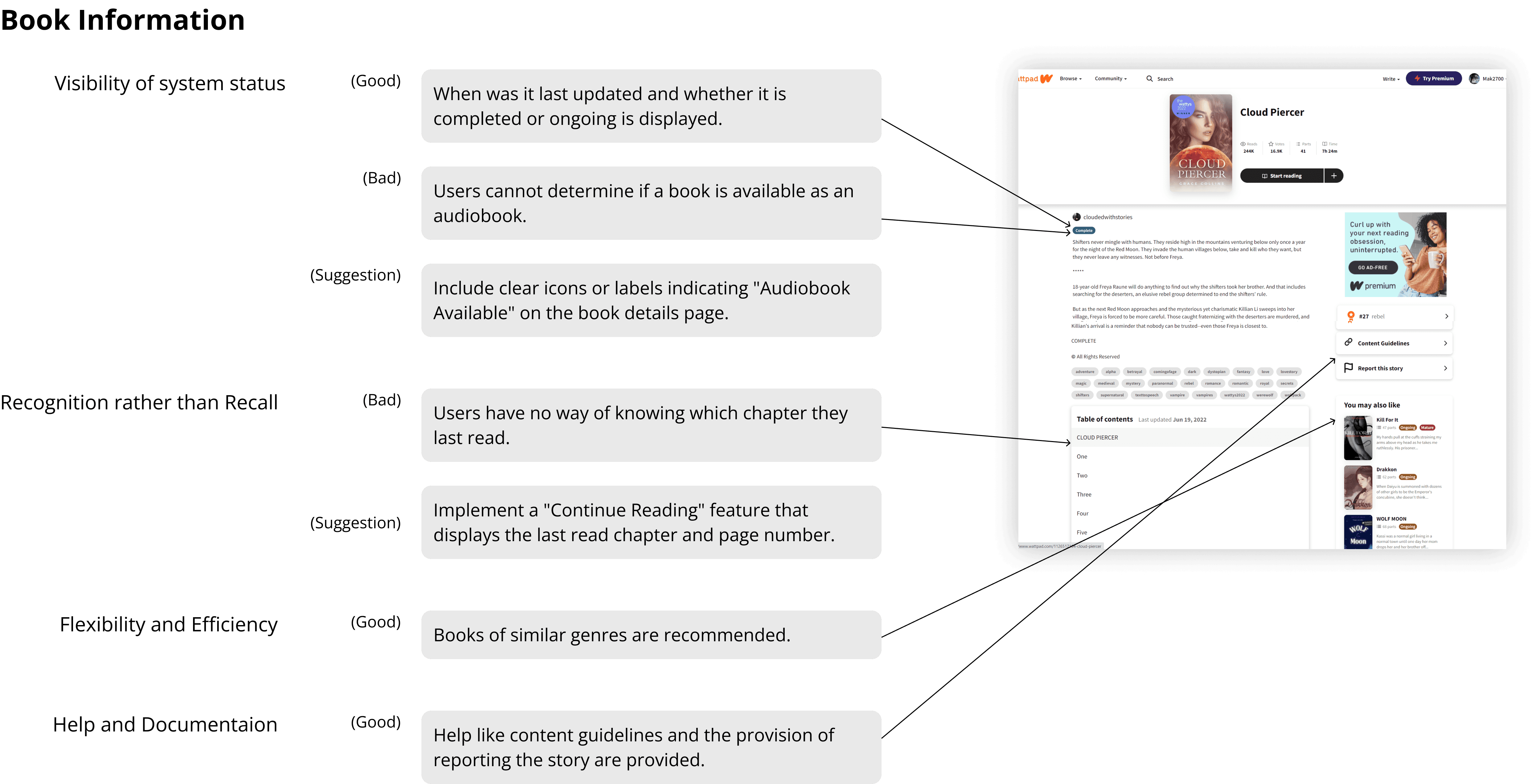
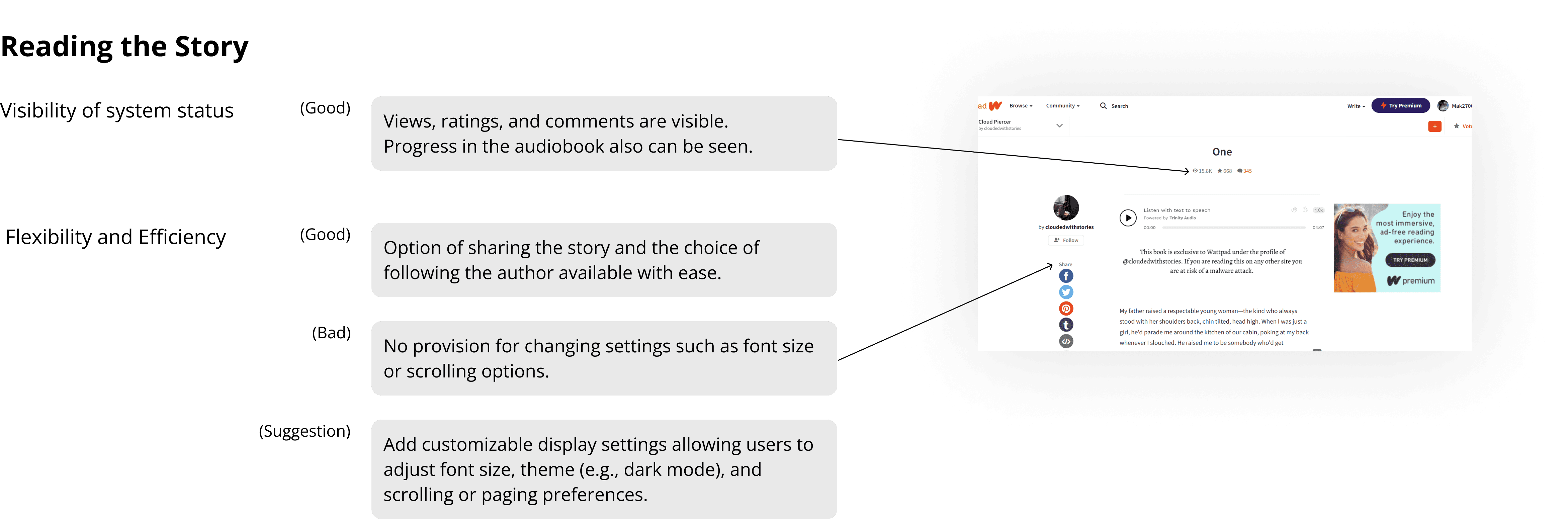
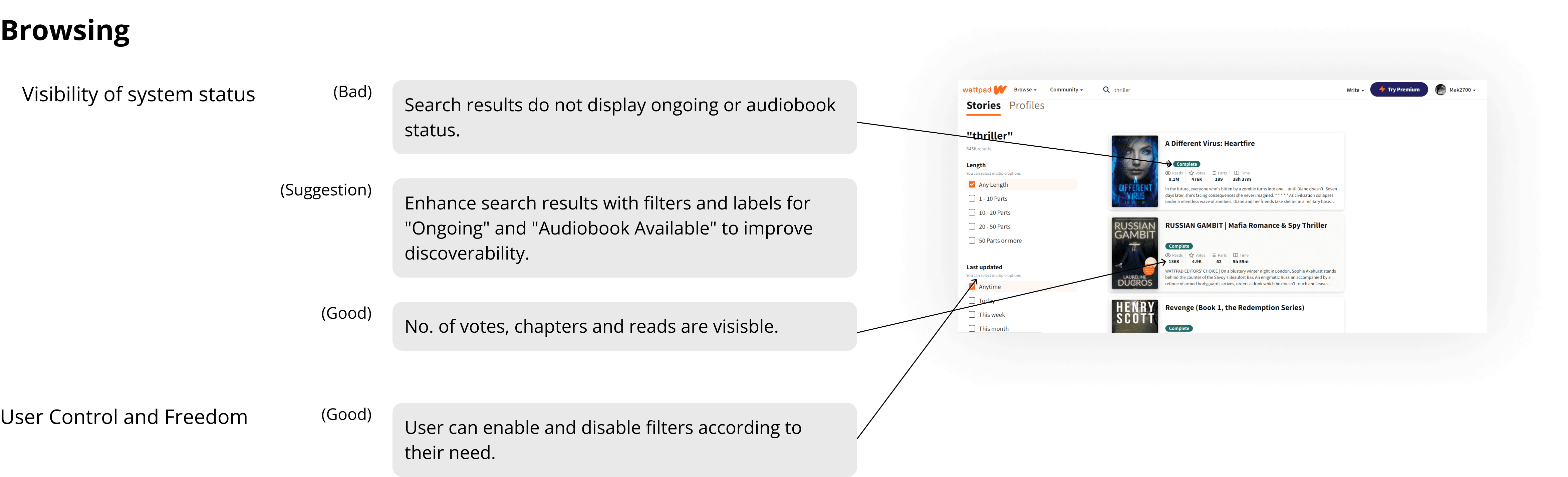
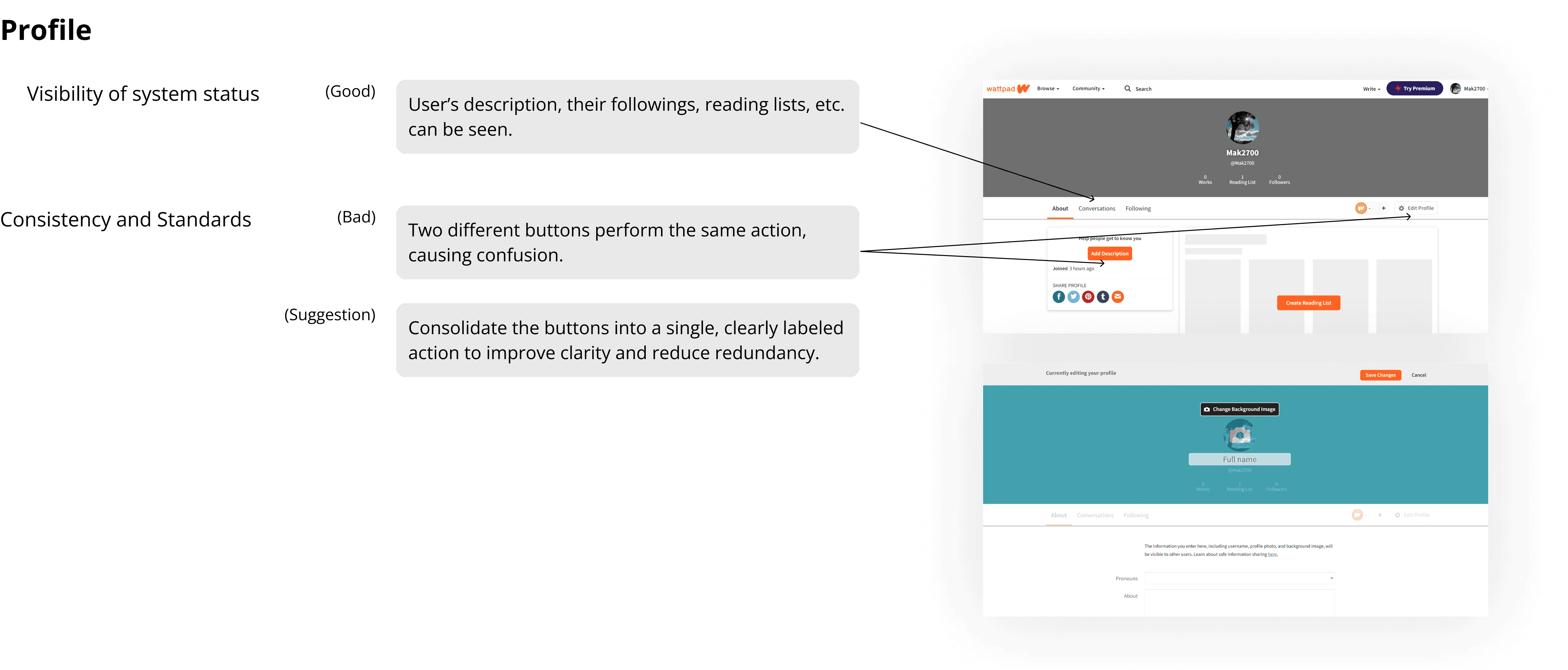
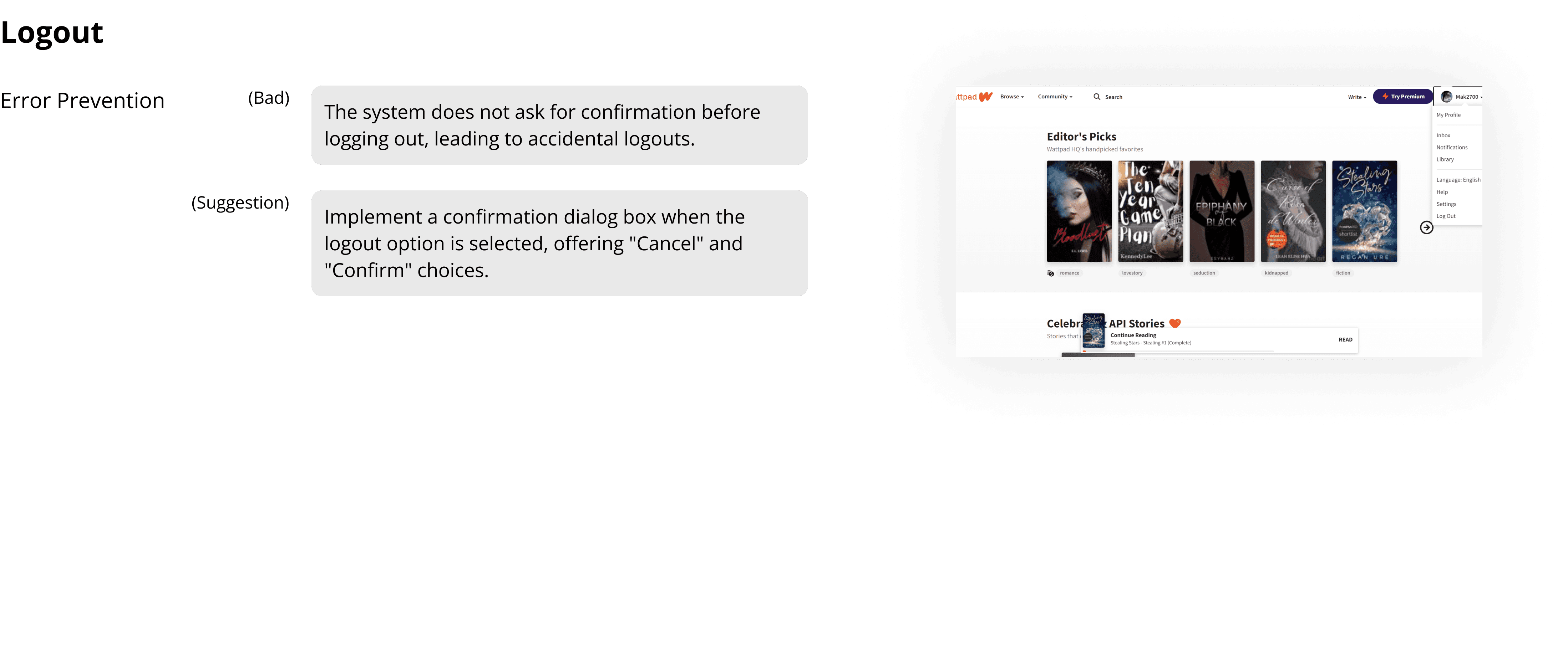
Heuristic Evaluation

Heuristic evaluation was conducted to identify usability flaws systematically, as it provides a structured approach to pinpointing usability problems based on established principles.

Jakob Nielsen’s 10 usability heuristics were used as a benchmark because they offer a comprehensive framework to evaluate critical aspects of the user interface.

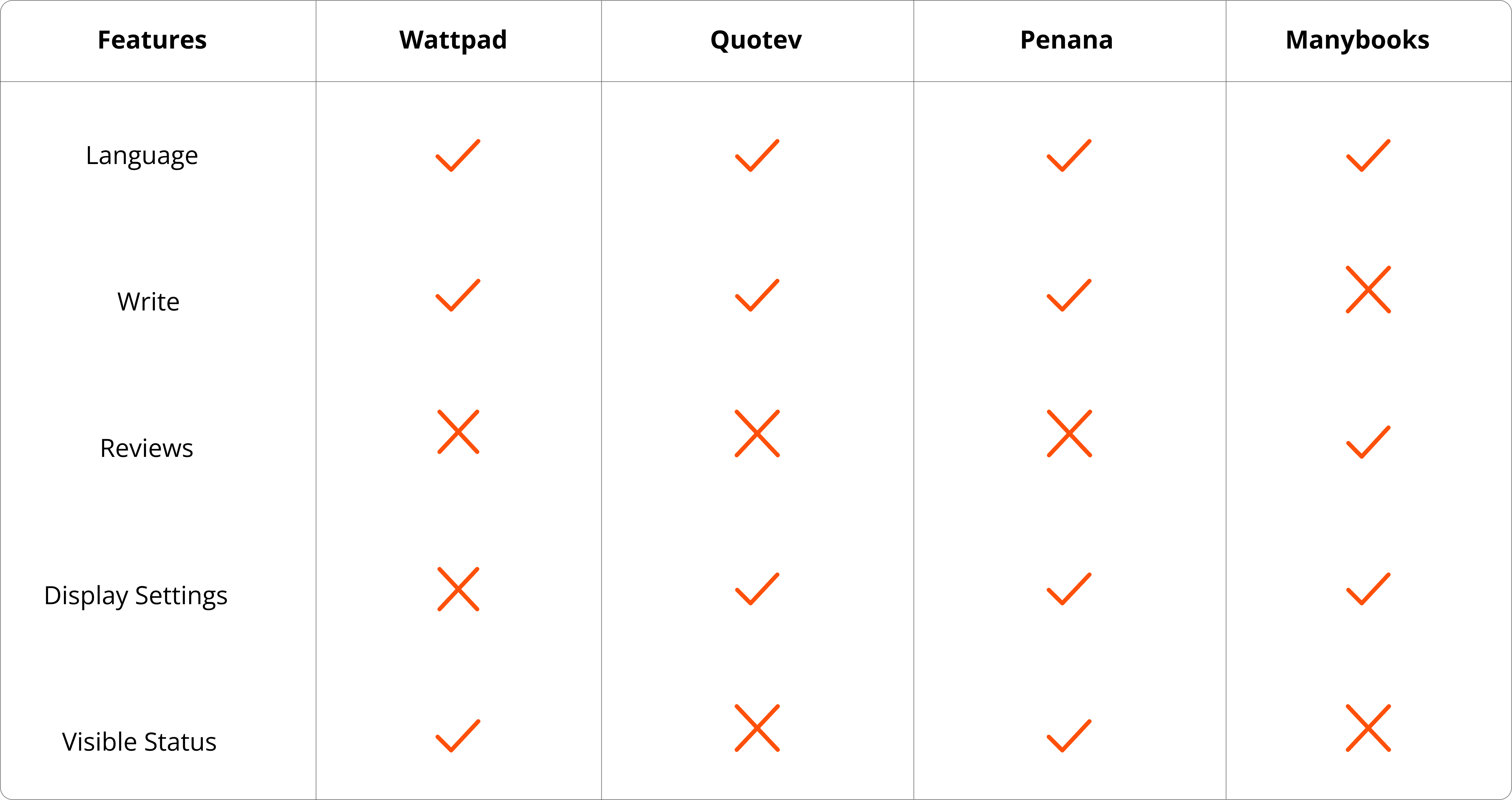
Competitive Study

Competitive Study

Competitive Study

Competitive Study

Primary Research

Interview

1:1 interviews were conducted with people aged from 16-45 who like to read as a hobby or a pastime.

Questionnaire

Questionnaire

Questionnaire

Questionnaire

Preliminary Questions

Preliminary Questions

Preliminary Questions

Preliminary Questions

  • What is your occupation?

  • How frequently do you read books

  • Which medium do you prefer to read books?

  • Which app/website do you use?

  • What is your occupation?

  • How frequently do you read books

  • Which medium do you prefer to read books?

  • Which app/website do you use?

  • What is your occupation?

  • How frequently do you read books

  • Which medium do you prefer to read books?

  • Which app/website do you use?

  • What is your occupation?

  • How frequently do you read books

  • Which medium do you prefer to read books?

  • Which app/website do you use?

Concluding Questions

Concluding Questions

Concluding Questions

Concluding Questions

  • How was your experience with the website?

  • What features do you like in a book reading website?

  • Any other suggestions?

  • How was your experience with the website?

  • What features do you like in a book reading website?

  • Any other suggestions?

  • How was your experience with the website?

  • What features do you like in a book reading website?

  • Any other suggestions?

  • How was your experience with the website?

  • What features do you like in a book reading website?

  • Any other suggestions?

Usability Testing

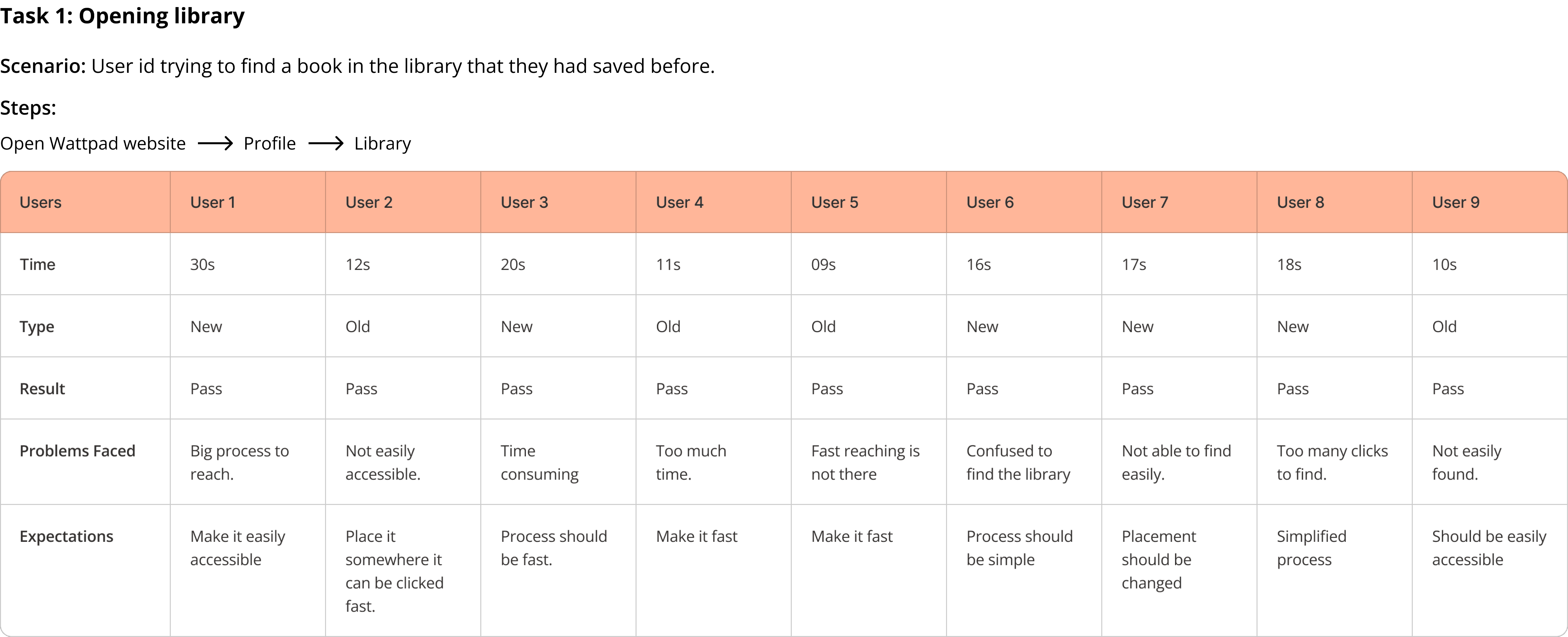
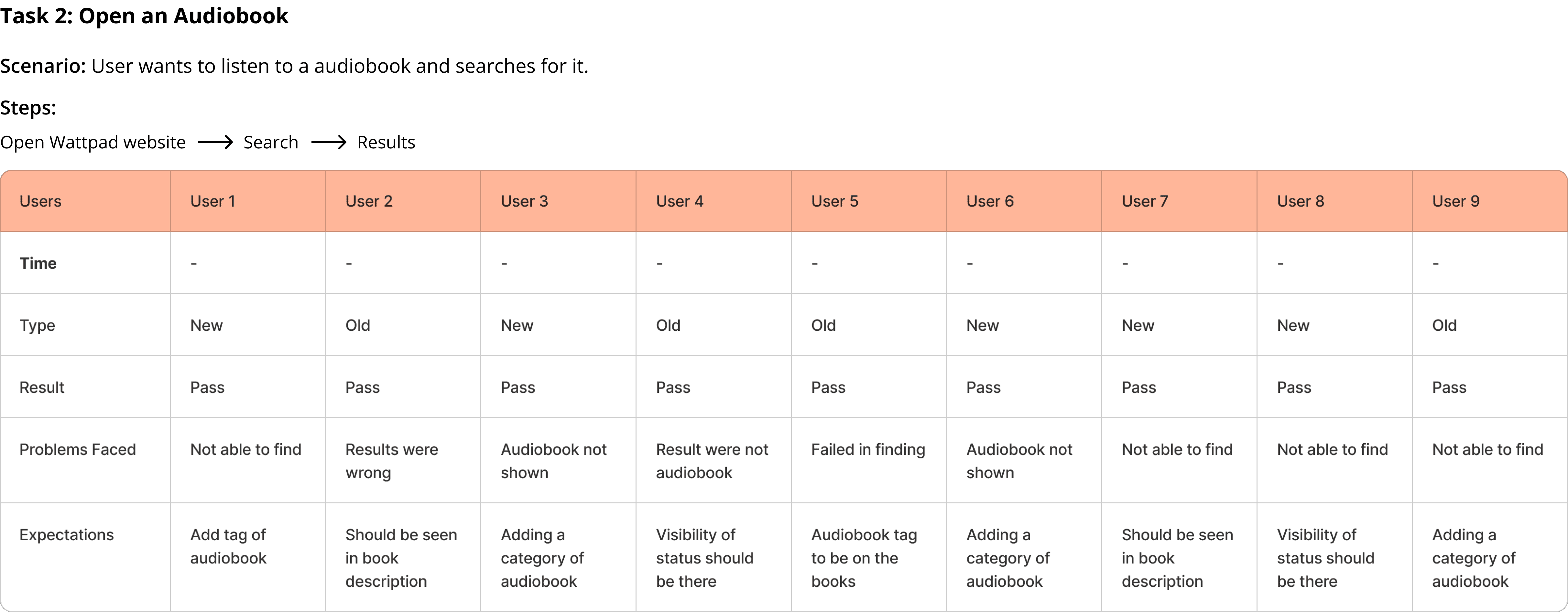
Usability testing was performed to gather first-hand data about user behavior and challenges. This method allowed observation of how real users interact with the website and highlighted pain points.
Problem Statement

The Wattpad website's existing user interface poses several challenges to content discovery and user experience, making a redesign necessary to improve usability and provide a more engaging and pleasurable reading environment for users.

Ideation

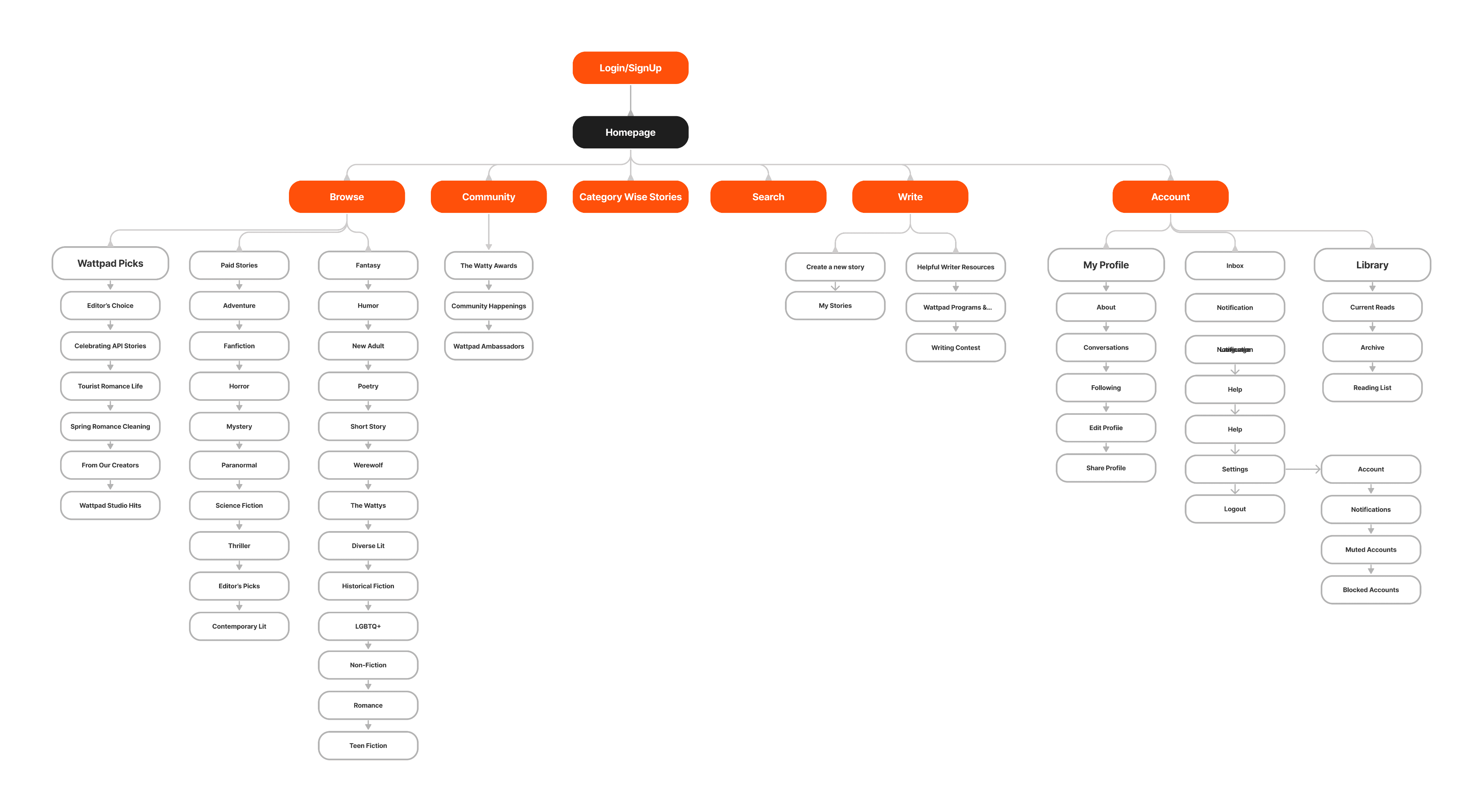
Existing Information Architecture

Insights

Insights

Insights

Insights

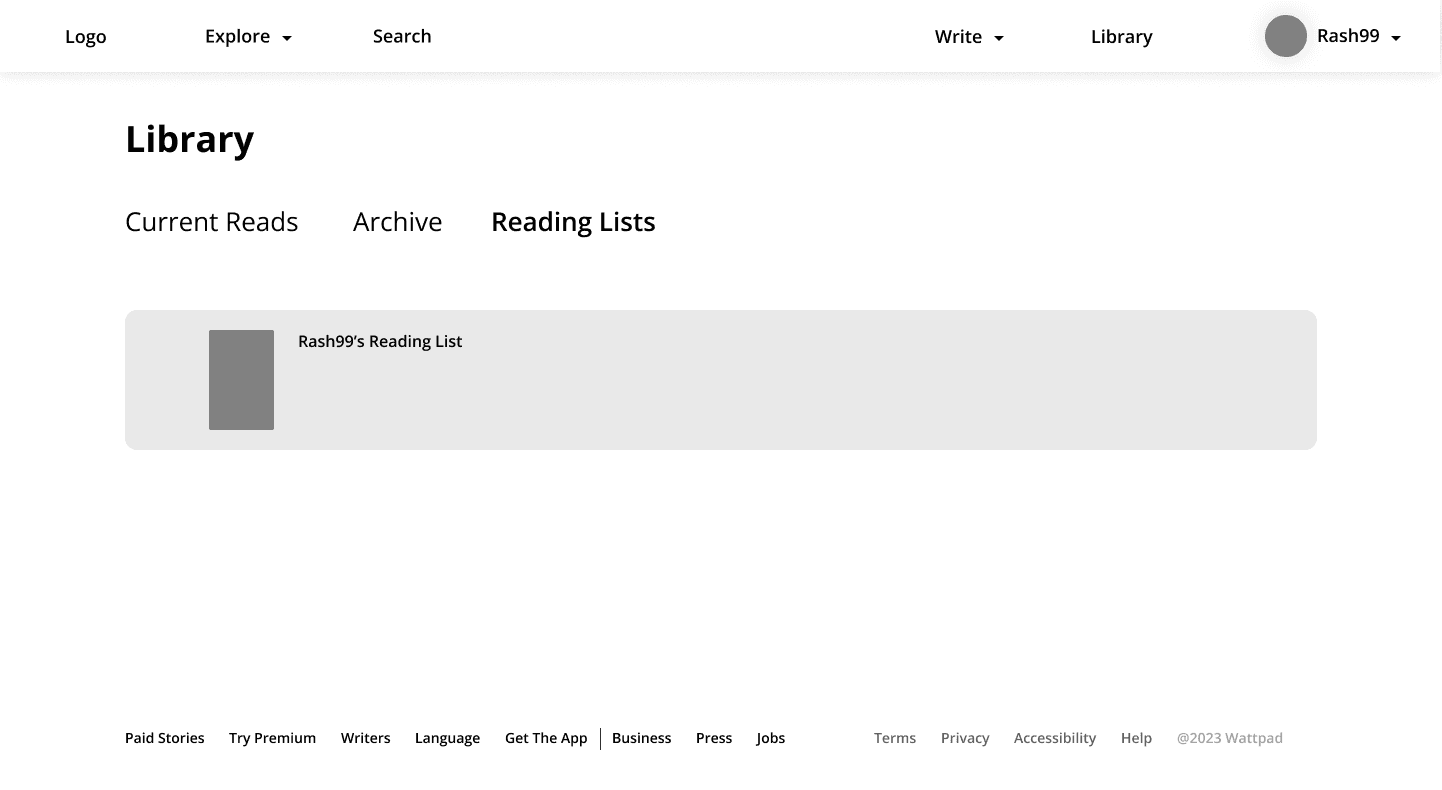
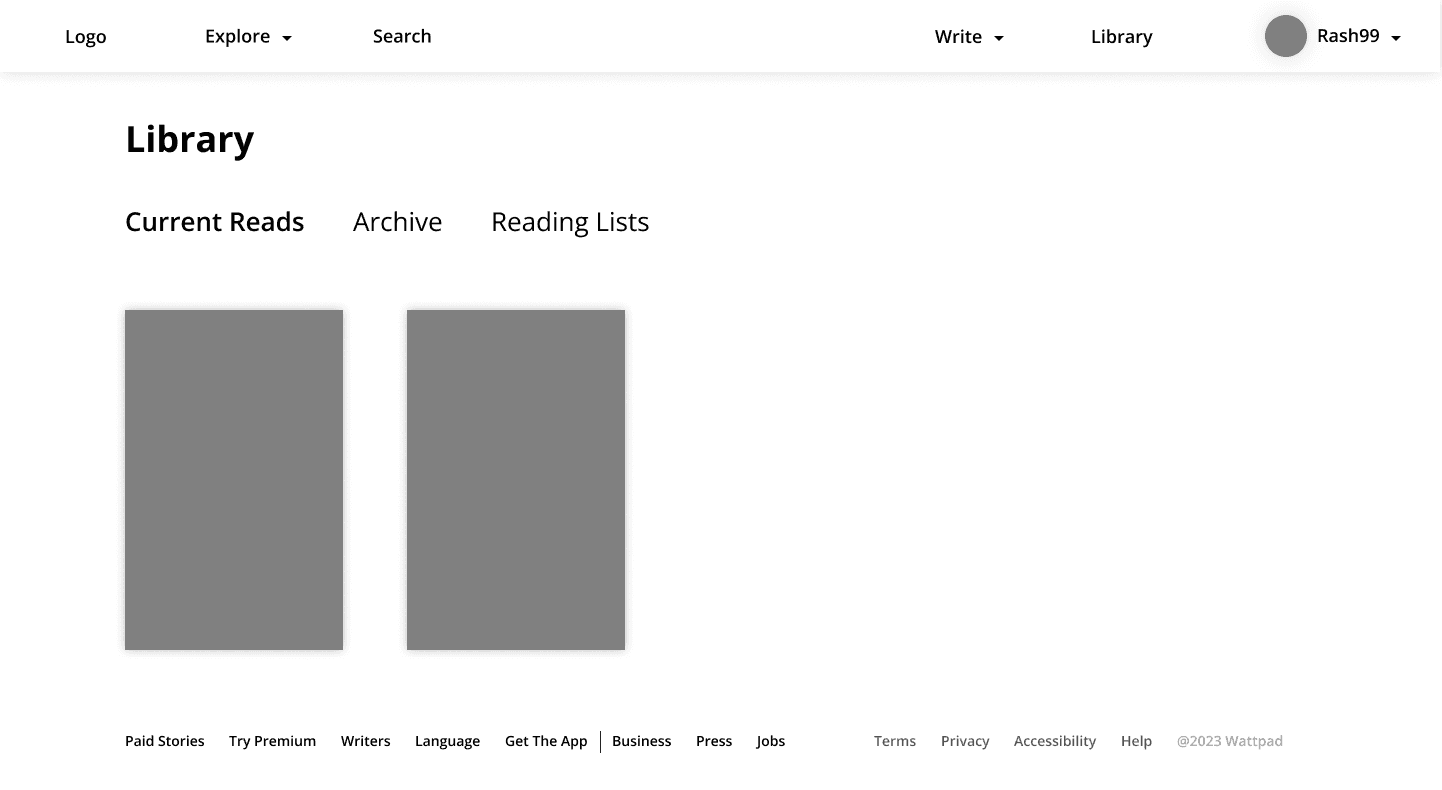
  • The library is not easily accessible.

  • Audiobook as a category not available.

  • Not being able to apply filters when browsing.

  • Details with proper status is not available for the books.

  • No flexibility for changing display settings while reading the books.

Brainstorming

Possible Solutions

Possible Solutions

Possible Solutions

  • Library and Inbox should be placed prominently on the navigation bar for easy access.

  • Book details should include title, author, and status (e.g., "Audiobook"), so that the users can make make quick decisions.

  • A dedicated review section could be added allowing the users to read and contribute reviews, fostering community interaction.

  • Providing display settings would allow customization of font size, background color, and text alignment to suit user preferences.

  • Paging instead of infinite scrolling could be added, allowing users to navigate chapters or lists more efficiently.

  • A filter panel that includes options such as genre, length, author, and ratings can be added to help users refine their search.

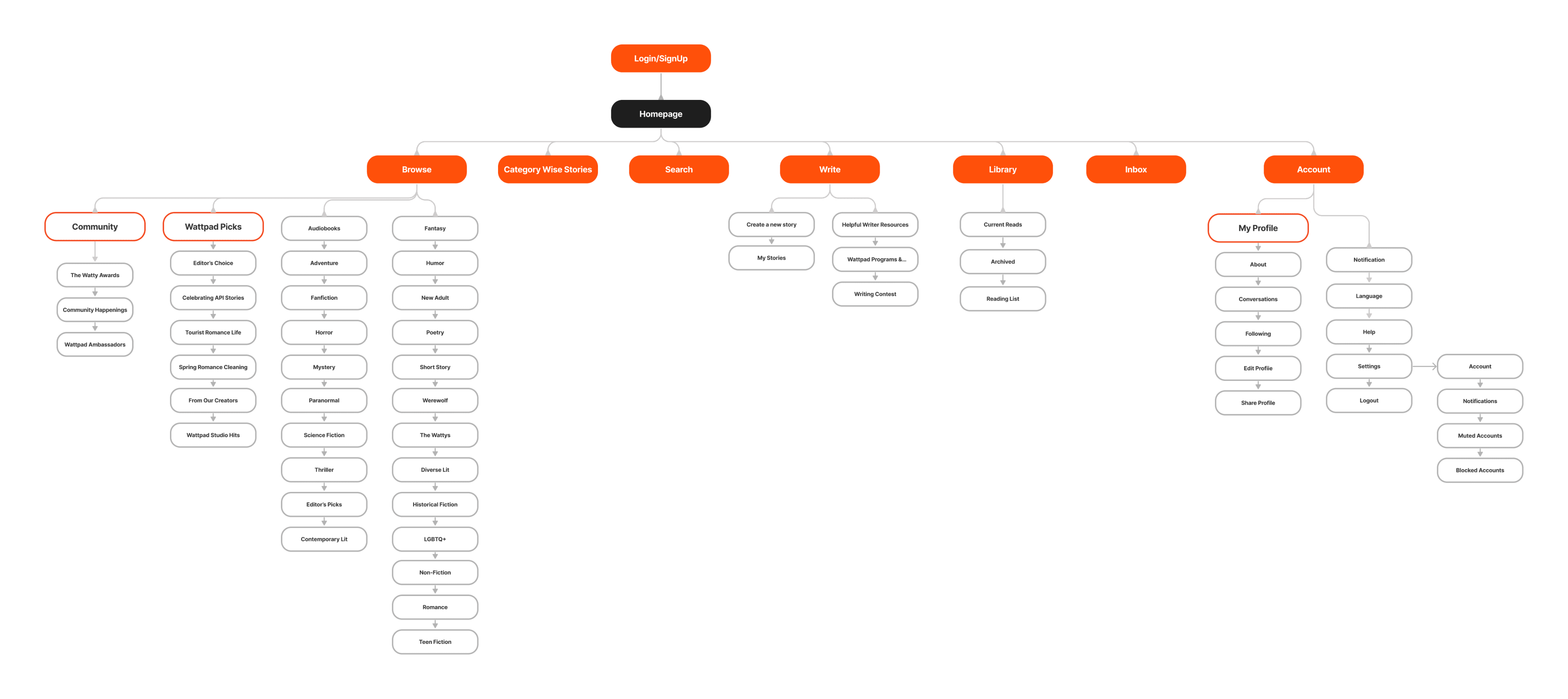
Revised Information Architecture

Low Fidelity

Style Guide

Colors

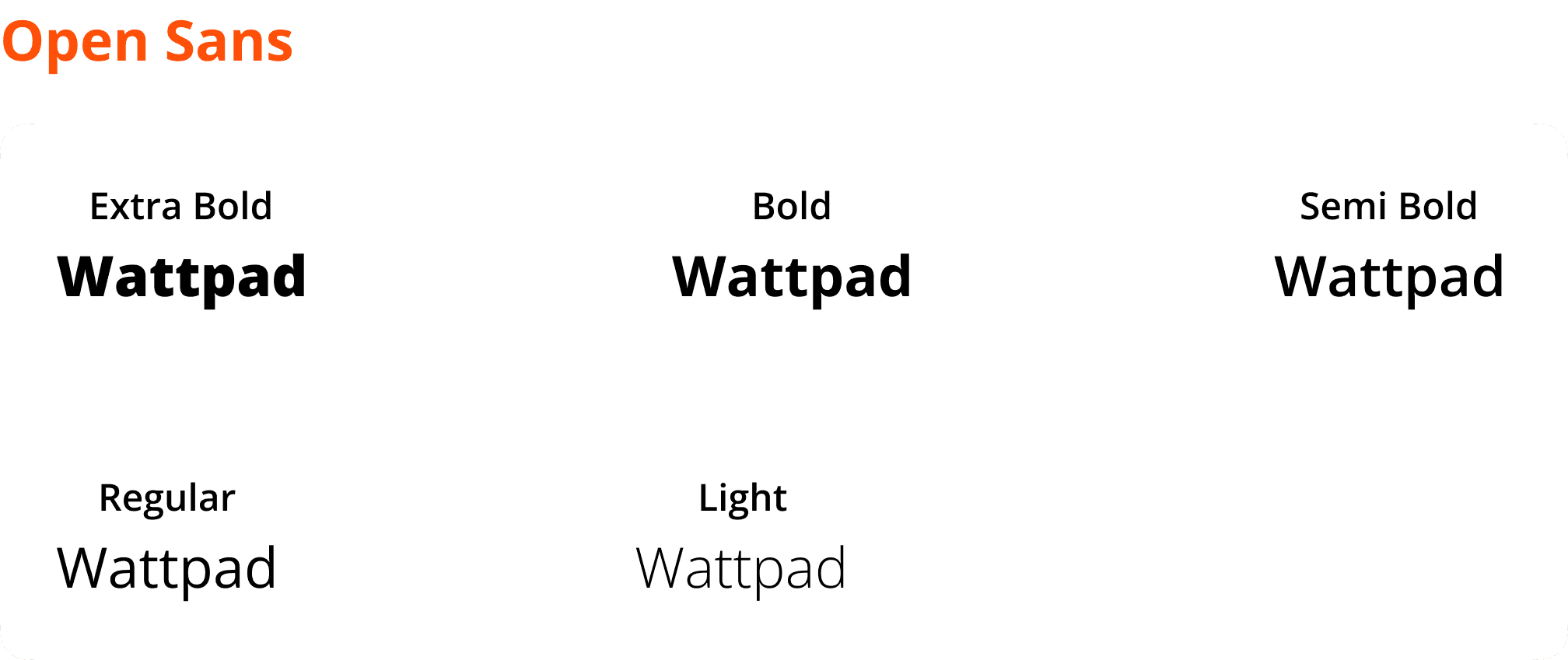
Typeface

Interactive Prototype

Usability Testing

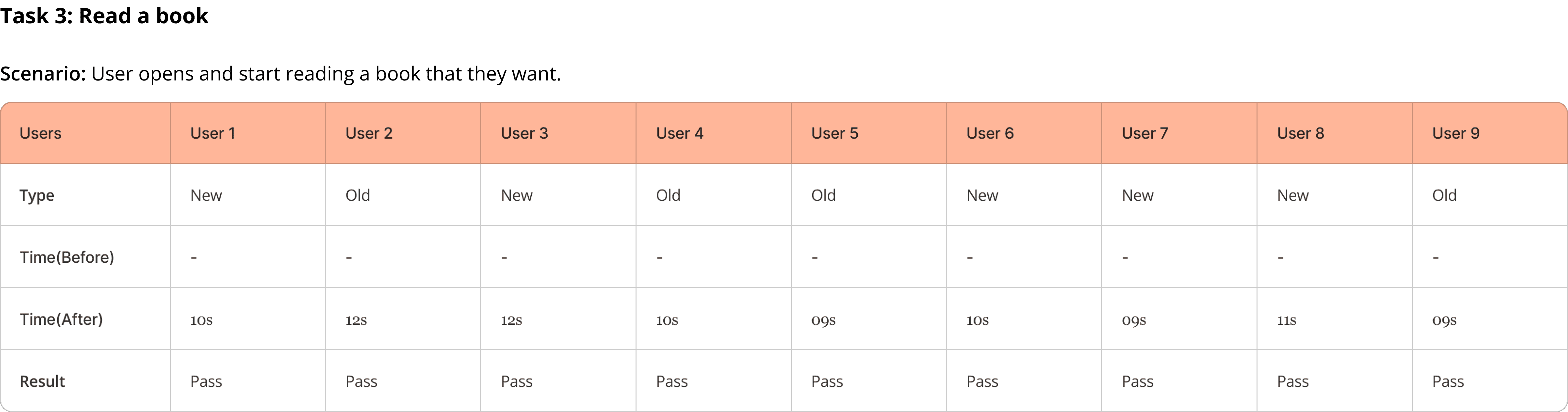
Usability testing validated the effectiveness of the redesigned features by measuring task efficiency and user satisfaction.

Usability Testing

Usability testing validated the effectiveness of the redesigned features by measuring task efficiency and user satisfaction.

Usability Testing

Usability testing validated the effectiveness of the redesigned features by measuring task efficiency and user satisfaction.

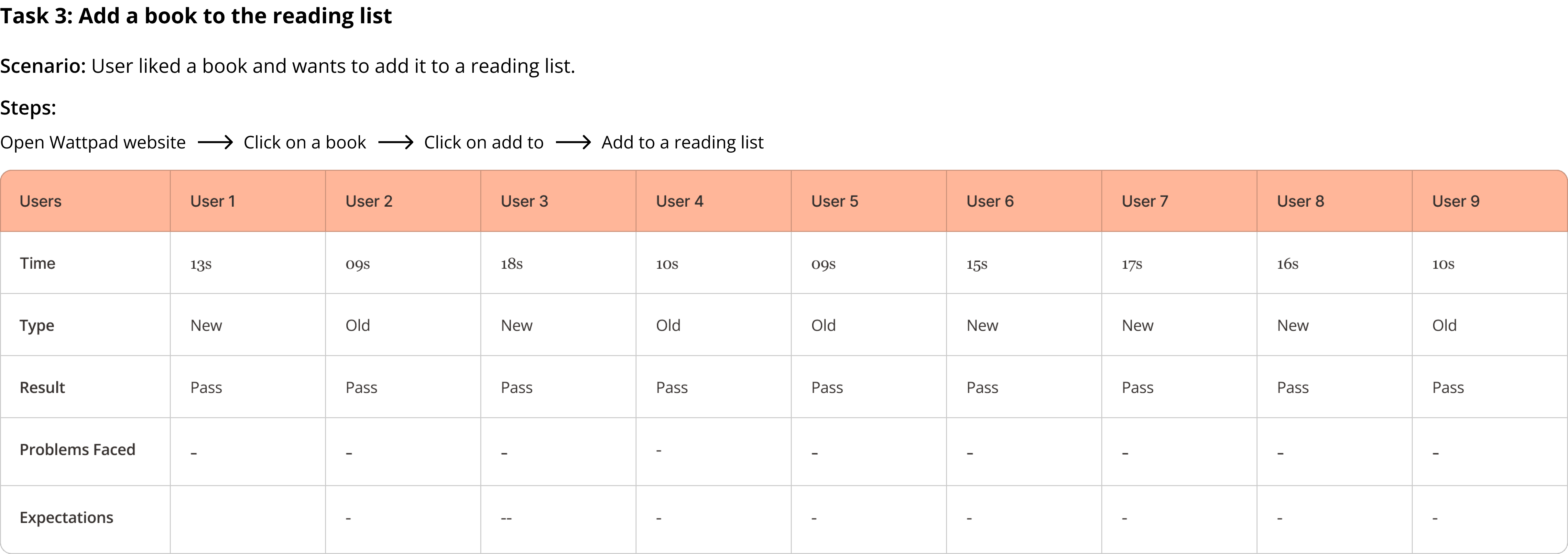
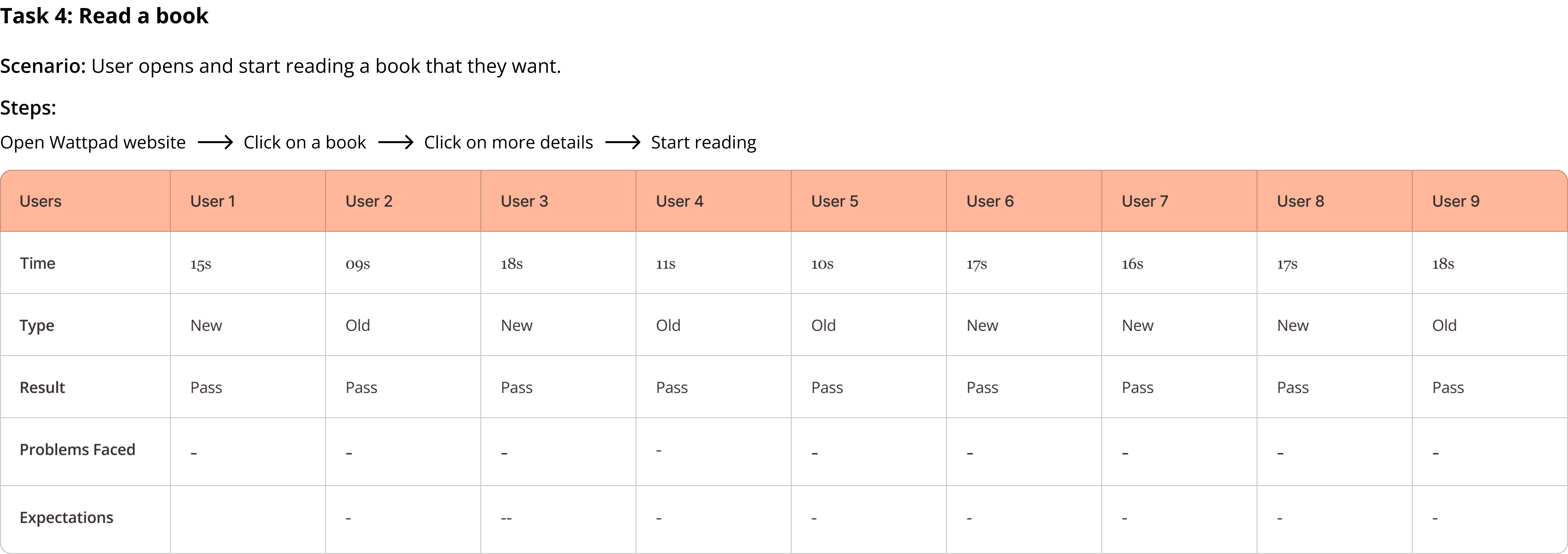
Task Analysis

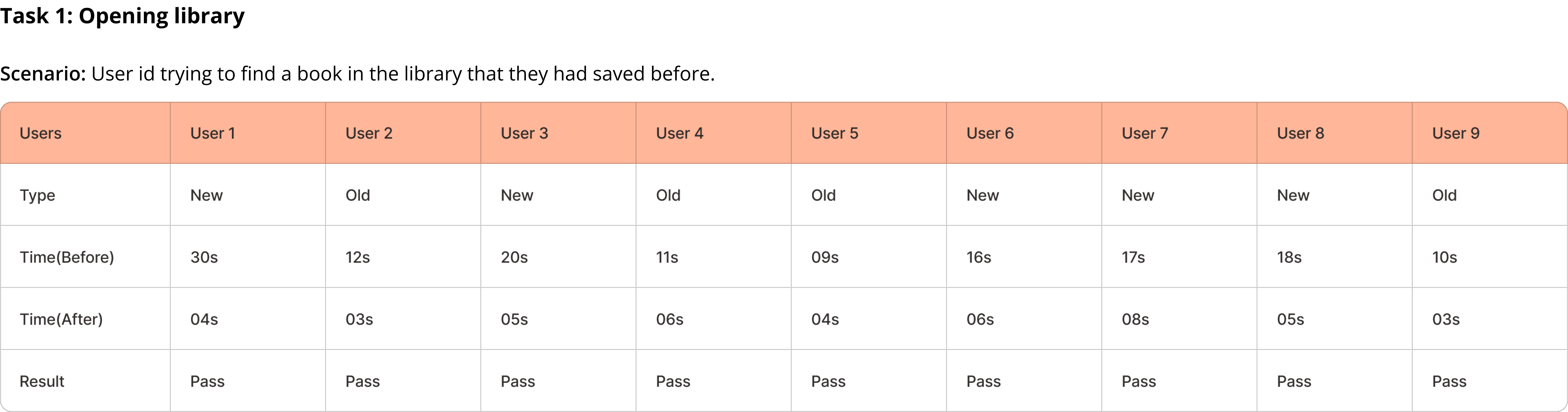
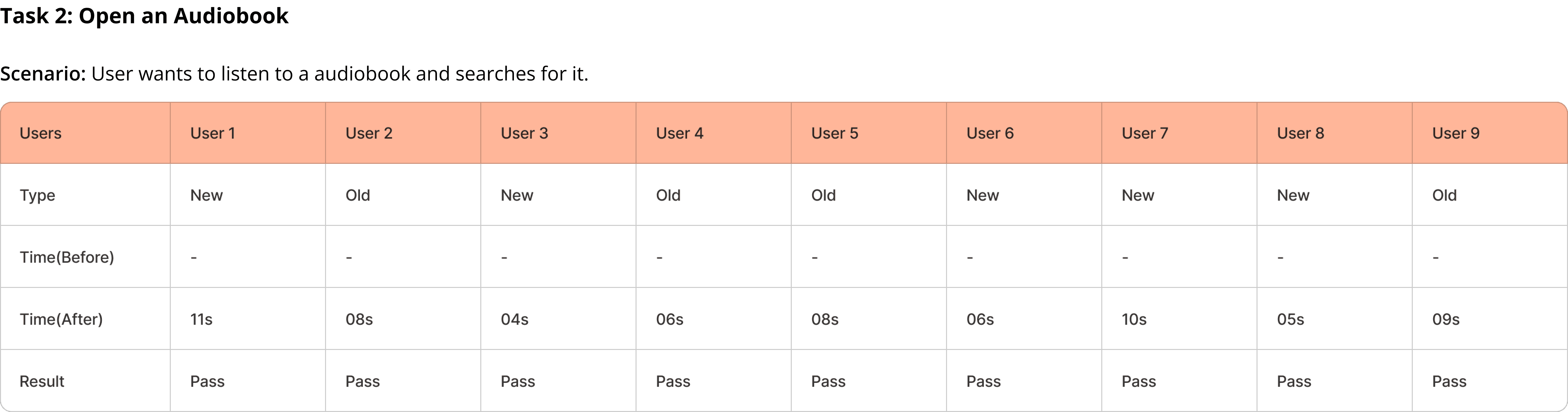
We have performed a task analysis to validate and check the proposed solution. The formula used for checking the average time taken by the users for each task is as follows

Task Time =

Task Time =

Task Time =

Task Time =

Time(user1) + Time(user2) +...+ Time(userN)

Time(user1) + Time(user2) +...+ Time(userN)

Time(user1) + Time(user2) +...+ Time(userN)

Time(user1) + Time(user2) +...+ Time(userN)

Total number of users

Total number of users

Total number of users

Total number of users

Completion Rate

Completion rate refers to the percentage of tasks that participants successfully completed without errors or assistance, serving as a key metric for assessing the usability of the interface.

Completion Rate(%) =

Completion Rate(%) =

Completion Rate(%) =

Completion Rate(%) =

No. of users who have successfully completed the task

No. of users who have successfully completed the task

No. of users who have successfully completed the task

No. of users who have successfully completed the task

No. of users who attempted the task

No. of users who attempted the task

No. of users who attempted the task

No. of users who attempted the task

System Usability Scale(SUS)

The System Usability Scale (SUS) is a widely used tool to evaluate the usability of a system through a quick 10-item questionnaire, providing a reliable measure of user satisfaction. A total of 6 participants were recruited to complete the SUS questionnaire after using the system for a predefined task. After completing the task on the platform, participants were asked to fill out the SUS questionnaire. 

The system achieved an average SUS score of 85.11, with scores ranging from 70 to 90, indicating a generally positive usability experience. According to established SUS guidelines, a score of 85.11 is above the industry average, a score of 68, suggests that the system is perceived as usable by participants. The above-average SUS score highlights the system's user-friendly design, making it suitable for a diverse user base with varying levels of technical expertise.
The System Usability Scale (SUS) is a widely used tool to evaluate the usability of a system through a quick 10-item questionnaire, providing a reliable measure of user satisfaction. A total of 6 participants were recruited to complete the SUS questionnaire after using the system for a predefined task. After completing the task on the platform, participants were asked to fill out the SUS questionnaire. 

The system achieved an average SUS score of 85.11, with scores ranging from 70 to 90, indicating a generally positive usability experience. According to established SUS guidelines, a score of 85.11 is above the industry average, a score of 68, suggests that the system is perceived as usable by participants. The above-average SUS score highlights the system's user-friendly design, making it suitable for a diverse user base with varying levels of technical expertise.

The System Usability Scale (SUS) is a widely used tool to evaluate the usability of a system through a quick 10-item questionnaire, providing a reliable measure of user satisfaction. A total of 6 participants were recruited to complete the SUS questionnaire after using the system for a predefined task. After completing the task on the platform, participants were asked to fill out the SUS questionnaire. 

The system achieved an average SUS score of 85.11, with scores ranging from 70 to 90, indicating a generally positive usability experience. According to established SUS guidelines, a score of 85.11 is above the industry average, a score of 68, suggests that the system is perceived as usable by participants. The above-average SUS score highlights the system's user-friendly design, making it suitable for a diverse user base with varying levels of technical expertise.

The System Usability Scale (SUS) is a widely used tool to evaluate the usability of a system through a quick 10-item questionnaire, providing a reliable measure of user satisfaction. A total of 6 participants were recruited to complete the SUS questionnaire after using the system for a predefined task. After completing the task on the platform, participants were asked to fill out the SUS questionnaire. 

The system achieved an average SUS score of 85.11, with scores ranging from 70 to 90, indicating a generally positive usability experience. According to established SUS guidelines, a score of 85.11 is above the industry average, a score of 68, suggests that the system is perceived as usable by participants. The above-average SUS score highlights the system's user-friendly design, making it suitable for a diverse user base with varying levels of technical expertise.

Final Outcomes

Enhanced Navigation

Enhanced Navigation

Enhanced Navigation

Enhanced Navigation

Library and Inbox on the navigation bar improved accessibility.

Library and Inbox on the navigation bar improved accessibility.

Library and Inbox on the navigation bar improved accessibility.

Library and Inbox on the navigation bar improved accessibility.

Customization

Customization

Customization

Customization

Display settings and audiobook controls personalized the experience.

Display settings and audiobook controls personalized the experience.

Display settings and audiobook controls personalized the experience.

Display settings and audiobook controls personalized the experience.

Efficient Browsing

Efficient Browsing

Efficient Browsing

Efficient Browsing

Filter panel streamlined audiobook discovery.

Filter panel streamlined audiobook discovery.

Filter panel streamlined audiobook discovery.

Filter panel streamlined audiobook discovery.

Informative Book Details

Informative Book Details

Informative Book Details

Informative Book Details

Status and reviews provided better engagement.

Status and reviews provided better engagement.

Status and reviews provided better engagement.

Status and reviews provided better engagement.

Error Prevention

Error Prevention

Error Prevention

Error Prevention

Logout confirmation minimized accidental errors.

Logout confirmation minimized accidental errors.

Logout confirmation minimized accidental errors.

Logout confirmation minimized accidental errors.

Conclusion

This project focused on addressing critical usability issues in Wattpad’s website to improve user satisfaction, engagement, and navigation. This project showcased the importance of understanding user pain points and redesigning an interface to address them effectively. By combining research insights with intuitive design, the Wattpad redesign significantly improved usability, accessibility, and user satisfaction.

This project focused on addressing critical usability issues in Wattpad’s website to improve user satisfaction, engagement, and navigation. This project showcased the importance of understanding user pain points and redesigning an interface to address them effectively. By combining research insights with intuitive design, the Wattpad redesign significantly improved usability, accessibility, and user satisfaction.

This project focused on addressing critical usability issues in Wattpad’s website to improve user satisfaction, engagement, and navigation. This project showcased the importance of understanding user pain points and redesigning an interface to address them effectively. By combining research insights with intuitive design, the Wattpad redesign significantly improved usability, accessibility, and user satisfaction.

Let’s connect!

Let’s connect!

Let’s connect!

Let’s connect!

Create a free website with Framer, the website builder loved by startups, designers and agencies.